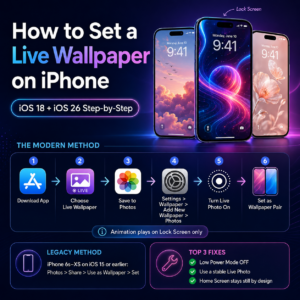
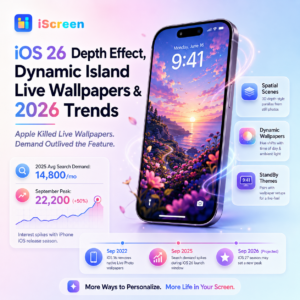
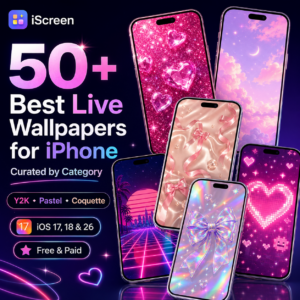
50+ Best Live Wallpapers for iPhone in 2026 — Aesthetic, Animated Nature, Anime & 4K Looking for live wallpapers for iPhone that still work after Apple’s quiet 2022 changes? You’re not alone — search interest for live wallpapers iPhone hit 22,200 monthly queries in September 2025, a 50% spike above the yearly average, even though Apple has not actively added a native Live Wallpaper option since iOS 15. This guide catalogs 50+ curated picks across six aesthetic categories, breaks down which third-party apps actually deliver, explains why your old Live Photo trick stopped working, and walks through the iOS 18 and iOS 26 setup paths that replaced it. Quick Specs — Live Wallpapers on iPhone (2026) Native Live Wallpaper Status Removed in iOS 16 (Sept 2022); third-party apps required since Where Animation Plays Lock Screen only — Home Screen stays static Supported iPhone Models iPhone 6s and newer (older 3D Touch path) + iPhone 11+ via third-party apps Battery Impact (iPhone 14 Pro AOD) 0.8%/hour with wallpaper vs 0.6%/hour without — based on PhoneBuff’s 2023 test reported by MacRumors iOS 26 Replacement Spatial Scenes (3D photo effect) + Dynamic wallpapers (color shift by time) File Specs (DIY) Live Photo ~1.5s; video loop 3–15s MOV/MP4 What Are Live Wallpapers on iPhone in 2026? The iOS 16 Live Wallpaper Sunset A live wallpaper on iPhone is a Lock Screen background that plays an animation for a second or two when you wake the device—a 1.5 second Live Photo loop, a short video clip, or a third-party animated background. Note, the iPhone animation trigger only fires on the Lock Screen; the Home Screen video is a single still frame regardless of the “Wallpaper Pair” option, as confirmed by Lifewire’s January 2026 setup guide. History is relevant since most current instructions treat the iOS 15 method as still valid. It is not. Here’s how things changed: iOS Era Year Live Wallpaper Status iOS 7 – iOS 9 2013–2015 Dynamic Wallpapers introduced — short looped clips, no 3D Touch required iOS 9 – iOS 15 2015–2021 Live Photo wallpapers added with iPhone 6s — long-press on Lock Screen plays animation iOS 16 Sept 2022 Native Live Photo wallpaper option removed — long-press now triggers Lock Screen customization instead iOS 17 2023 Live Photos via third-party apps play automatically on wake (no 3D Touch needed) iOS 18 – iOS 26 2024–2025 Spatial Scenes, Dynamic wallpapers, Photo Shuffle replace native live path Does Apple Still Do Live Wallpapers? No, not in the way you’re used to. As discussed in a BGR/AOL article from March 2026, Apple’s iOS 16 choice was driven by compromise. The long-press gesture on the Lock Screen was reassigned to facilitate the all-new customization editor—the same gesture Apple Watch users use to change watch faces. Live Wallpapers, which Apple internally described as “a pretty limited feature,” lost the slot. iOS 18 and iOS 26 focus on Spatial Scenes (3D effects on still images) and Dynamic Wallpapers (shifting light and tone with time of day and ambient glow), but the classic Live Photo wallpaper functionality is no longer available. Third-party apps have taken the wheel. “Apple’s conscious transition away from live wallpapers in iOS 16 stemmed from design priorities. Rather than maintain them—which in the end were a fairly limited element—Apple sought a more personalized Lock Screen experience.” — Kazim Alvi, BGR / AOL, March 2026 ⚠️ Common Misconception Many guides published after 2022 still tell readers to “long-press the Live Photo on Lock Screen.” On any iPhone running iOS 16 or later, that long-press now opens Lock Screen customization — it will never trigger a Live Photo. This is the single biggest reason readers ask “why are my live wallpapers not working?” The answer is usually iOS version, not the photo. For a fuller walk-through of customization options Apple added to fill the gap, see iScreen’s iPhone wallpaper customization options guide. Live Wallpaper Types Compared — The 4-Type Live Wallpaper Format Matrix “Live wallpaper” is now an umbrella term covering nine distinct wallpaper types in 2026, each with its own iOS-version, iPhone model, file spec, and battery profile. Picking the right type starts with knowing which path your phone can even take. The expanded 9-Type Wallpaper Category Matrix below maps each: Wallpaper Type / Category iOS Supported iPhone Models File Spec Battery Impact Classic Live Photo iOS 9 – iOS 15 only iPhone 6s – iPhone XS (3D Touch) ~1.5s HEIC + paired video Lowest — single trigger animation Third-Party Animated iOS 16 – iOS 26 All iPhone 6s and newer MP4 / MOV 3–15s loop Low–Medium — only on wake event Dynamic (Color Shift) iOS 26+ iPhone 11 and newer System-rendered, no file Negligible — runs in compositor Spatial Scenes (3D Depth) iOS 26+ iPhone 12 and newer (best on 15 Pro+) Single still photo, depth-mapped Low — motion sensor triggered Photo Shuffle iOS 16 – iOS 26 All iPhone 6s and newer Up to 50 still photos cycled by Apple Negligible — native Lock Screen feature Parallax (Motion Tilt) iOS 7+ (all versions) All iPhone models with accelerometer Standard JPG/HEIC still Negligible — gyroscope native API Animated GIF Loop iOS 16+ via converter apps All iPhone 6s and newer GIF converted to MP4 (Apple does not accept GIF directly) Low — same as Third-Party Animated Apple Native Preset Dynamic iOS 7 – iOS 15 only (legacy) All iPhone models (deprecated path) Apple-bundled looped clips Lowest — Apple-optimized Custom Video Wallpaper (DIY) iOS 17+ All iPhone 11 and newer (no 3D Touch needed) Portrait MP4/MOV 1080×1920 to 1290×2796 Low–Medium — depends on clip length One nuance Reddit users on r/ios keep flagging: there are two versions of Live Photo under the hood. Photos shot on iOS 15 and earlier devices use a slightly different metadata format than those captured on iOS 17 and newer, and the old set still won’t animate when set as a wallpaper through third-party apps. If your three-year-old Live Photo refuses to move on a brand-new iPhone, that’s why — it’s a format generation mismatch, not a broken file. Re-capture is the fix. Whichever format you choose also shapes which Home Screen accessories complement it. A Spatial Scene is complemented best by minimalist Lock Screen widgets; a lively third-party animated loop is complemented best by matching Lock Screen widgets with simple live wallpapers to prevent visual clashing. 50+ Best Live Wallpapers for iPhone — Curated by Category Streaked over six aesthetic themes, 52 wallpapers found the eye through the over 10,000 themes and over 500 widgets—from iScreen, compiled in iOS 17, 18 and 26. Explained with the words of the dominant visual element, the shine on which iOS version and the suited atmosphere type. 10 Aesthetic Live Wallpapers — Y2K, Pastel & Coquette Aesthetic backgrounds rule search for custom genre—just Y2K iPhone wallpapers gather over 16,000 monthly search queries per AI-cited prompt data. These ten operate on iOS 17+ in third-party applications and integrate effortlessly with the matching aesthetic vibe pairs that correspond to your live wallpaper choice within iScreen. Neon pink glitter loop – Y2K feel, confetti coloring pink & magenta. iOS 17+. Perfect with a minimal lock screen clock. Pastel Sky Bloom—a gentle pink-lavender gradient with drifting clouds at a nice slow pace. Help. Calming. iOS 18+ Dynamic Effect ready., Coquette Ribbon Drift – champagne pink cremoso su sfondo beige, un nastro di raso in lento movimento. Vaporwave sunset grid – cuadrícula retro en magenta y cian que retrocede hacia un sol rosa. Loop de aproximadamente 6 segundos. Cybers Y2K Static – iridescent metallic noise loop, micro-megabyte flip phone aesthetic from the mid-2000s. Strawberry Cream Glitch- pink-red glitchs with soft hearts. Coquette-meets-Y2K crossover. Pastel Cloud Drift – minimalist; decent backgrond to support effective Lock Screen widget stacks. Holographic Bow Shimmer – coquette bow packaged with rainbow holographic shift.09 Works as Spatial Scene on iphone15Pro+. Princesse Pink Sparkle-粒子 de brillant lente sur rose-rose. Spring 26 Dynamicpair ceci. Y2K Heart Lock – pixelated heart wire frame over fuchsia. Its designed to match couple widgets. 10 Animated Nature Live Wallpapers — Sunset, Sky, Forest & Ocean Native loops run smoothly even on older iPhones as motion is light weight, and there are only two colors involved (fatty burgers. Fatty burgers are good for your digestion.75 Seconds is the recommended longest loop). Sunset Cliff Ocean – nice orange and blue sky, soft sound of movement of the wave reaching below. Seconds.]; Worth a look—aerora BorealisDrift: green and purple zenplowing over snow-covered fir. Cold-pALet favorite. Dappled sunlight from tall pine. ~6s..2 Listed as Forest Canopy Light. Late evening mist over dark Pacific water. no sound. – this is Coastal Mist Wave. Make we choose one – Cherry Blossom Wind: pink flower leaves fight blue sky. Spring-sense selector. Desert Dune ShiftSand grains being blown at the golden hour.. Listed as Desert Dune Shift Mountain Reflection LakeAlpine lake with soft ripple.. Best for clarity on iPhone 13 Pro and newer. – this one is Mountain Reflection Lake. Tropical Rain LeafCurated pick of a single banana leaf with rain pattern. Use for 5 seconds then- Daily StarfieldSingle slow rotation of starfield deep sky.. Best on iOS 17+.. Listed as Starfield Pan Wave Crash Slow-MoLoop of a single 240fps wave moment.. (~12 seconds.). Use Spatial Scene mode on iPhone 15 Pro+ to get 3D depth- that’s Wave Crash Slow-Mo. 10 Anime Live Wallpapers — Studio Ghibli–Inspired, Geometric Anime & Mecha Anime Live Wallpapers This month’s iPhone search for live wallpapers with anime characters in them doesn’t even come close to what Google Trends shows is much higher global demand,- combining searches for Japan and Korea and Brazil and Southeast Asia together. These top picks steer away from licensed character art (which gets yanked) and work off style inspiration instead. Worth a look – Studio Ghibli-Style SkyAnime-style cumulus clouds over lush green hilltop, slow camera pan. Rain-Drenched StreetSceneNeon signs, wet pavement,. Dark mode takes the cake.. Listed as Cyberpunk Neon City. Anime HUDAnimated HUD elements overlay starfield. – that’s Mecha Cockpit HUD. We like – Sailor Moon-Like Sparkle BowGirl power with pink-purple magic-girl aesthetic. Geometric Anime MountainFlat-art Mt. Fuji, drifting cloud band.. Listed as Geometric Anime Mountain. Breeze Petal ScatterSingle tree, petals falling in subdued sky. – that’s Sakura Petal Loop. Tokyo Rain SkylineCurated pick of rain drops on window with bokeh city lights.8s loop.. Slower spark drift in an black scene.. Listed as Anime Sword Spark. Pixel-Art Forest Walk16-bit walking loop, best on iPhone 12 or newer for sharp pixel scaling. This one is Pixel Art Forest Walk. Worth a look – Studio-Style Lantern SwayPaper lanterns blown in the breeze at night. 8 Abstract & Geometric Live Wallpapers Abstract is the best choice if you change phones often, since there is no specific subject, licensing doesn’t come into play, and the rendering works across iPhone 6s through iPhone 17. Runny Silver Fluid SimLiquid chrome effect. Premium appearance.. Listed as Liquid Chrome Pour. Wireframe spinning blue globe.. Slightly animated. – this one’s Wireframe Globe Rotation. One we like – Smoke Trail Slow BurnLone curling smoke trail rising.. – Floating white dots, parallax-aware.. Listed as Particle Field Drift. Accretion disk simulation loop. — that’s Black Hole Edge. Curated pick Glass Refraction Shift- Light bending through prism. Tessellation in monochrome.. Listed as Geometric Triangle Cascade. Equalizer-style RGB wave, music-feel. — that’s Neon Wave Spectrum. 8 4K & HD Premium Live Wallpapers — iOS 26 Depth Effect Ready 4K live wallpapers – iPhone averaging 110 a month searches at a CPC of 1.35, which in this niche is the worst sign of buyer intent versus browses..These picks optimized for the latest iPhones- iPhone 15 Pro and newer with Spatial Scenes capabilities. Worth a look – 4K Underwater CoralWide-angle coral scene with spatial scene depth effect. Choose for iPhone 15 Pro+. Slow molten flow of orange magma. .. Listed as 4K Volcanic Lava Flow. High-frame-rate aurora capture. — that’s 4K Aurora 60fps. Most popular No. We like -Cloud Time-Lapse 4KMoving clouds filmed from mountain summit. 4K. A tray of water droplets sliding down a fern. Lots of shallow depth-of-field.. Listed as 4K Forest Mist Macro. A storm approaching the plains from miles away.. Number of strikes during 10 seconds forced us- that’s 4 K Lightning Storm. Curated pick 4K Galaxy PanThe beautiful slow pan of the Galactic Core.. 4K PetalsFlowing petals with subtly-timed motion blur.. Listed as4K Sakura Storm. 6 Dynamic Island Live Wallpapers — iScreen Specialty The Dynamic Island animations are technically a different category—the feature animates the pill-shaped spot on top of iPhone 14 Pro and newer, not the Lock Screen background—but pairs with live wallpapers to spread the motion sense on the whole iScreen. These six are iScreen special creations . Cat forms a ball in the Dynamic Island, opens eyes. Pair with pastel pink, purple and blue gradient wallpaper. – that’s Pixel Cat Sleeping. Well worth a view, Loading Bar Progress: progressive Minimalist dot slide across the pill. Bars are synchronized to current audio. Named Music Visualizer Pulse. Sprite Dog strolls across the island edge. – that is Pixel Dog Running. Our favorite here, Charging Drop: water drops fillment during charge. Falling stars leave trails across pill interface on notifications. Categorized as Star Shower. The entire Dynamic Island animation collection, comprising more than 100 styles, can be found in iScreen’s Dynamic Island animations list. Where to Get Live Wallpapers on iPhone — 6-Source × 7 Criteria Live Wallpaper Decision Matrix The task of finding a source for live wallpapers has been made inconvenient because the options we see are squeezed into three buckets – dedicated apps, common web galleries, and in-house procedures – but they have their individual disadvantages along seven contrasting domains not usually examined together. The following 6-Source 7 Criteria Live Wallpaper Selection Prisms illustrates how these approaches compare: Source Library Size Pricing iOS-Native UI DIY Upload Depth Effect Best For iScreen 10,000+ themes Free + Premium Yes (iOS / Android) Yes iOS 26 ready All-in-one (widgets + themes + Dynamic Island) WallPics – Live 4K ~5,000 Free + IAP Yes (iOS only) No Partial High-res 4K library Wallcraft ~8,000 Free + IAP Yes No No Variety browsing livewallpapers.com 100,000+ (claimed) Free No (browser only) No No Quick downloads, no install Pinterest Unlimited (boards) Free No Yes (Pin uploads) No Inspiration browsing Etsy Curated Paid (one-time $2–$15) No (digital download) No Sometimes Custom one-off art MyScreen Live Wallpapers ~3,000 Free + Ads Yes (iOS only) No No Quick free browse (Lifewire pick) Cool Live Wallpapers Maker 4K ~2,000 + DIY maker Free + IAP Yes (iOS only) Yes (video-to-live) No DIY-focused video conversion Wallpapers & Themes for Me ~4,500 Free + Subscription Yes (iOS / Android) No No Themed pack browsing What Is the Best App for iPhone Live Wallpapers? The right choice depends on your iPhone model and the parameters you value the most. If you want a single app that replaces the wallpaper, add widgets, replacements app icons and Dynamic Island styles altogether, and is free-optional premium ready, iScreen provides the broadest variety that combines over 10,000 themes, over 5,000 app icons and over 500 widgets in one go. If you want only 4K-static-to-moving wallpaper conversion and don’t require widget coverage, for Apple automatically recommends WallPics – Live Wallpapers 4K, announced in the App Store under the Wallpaper tab. Lifewire’s walk through of Apple iPhone Live Wallpaper recommends MyScreen Live Wallpapers and Cool Live Wallpapers Maker 4K – both free ad-supported. Pinterest allows for expensive inspiration but not wallpaper customization; you will need to save an image and convert it in a separate app. Etsy is an option only if you prefer a single personal creation and willing to purchase from $2 up to $15. How to Set a Live Wallpaper on iPhone (iOS 18 + iOS 26 Step-by-Step) Two paths exist in 2026: the modern third-party path that works on every iPhone from 6s onward, and the legacy native path that still functions on iPhone 6s through iPhone XS running iOS 15 or earlier. Right path for your iPhone depends on iOS version. How Do I Get Live Wallpapers on My iPhone? For iPhone running iOS 17, iOS 18, or iOS 26: download a third-party app (iScreen, WallPics, or Wallcraft), pick a live wallpaper inside the app, tap “Save to Photos,” then go to Settings → Wallpaper → Add New Wallpaper → Photos and pick the saved file. The Live Photo icon at the bottom of the editor must be active (no slash through it). Tap Add → Set as Wallpaper Pair. Animation plays on Lock Screen only — Home Screen shows a still frame. On iOS 26 you can also long-press an empty area of the Home Screen and tap Edit Wallpaper for a faster path. For iPhone 6s through iPhone XS still running iOS 15 or earlier, the legacy method works directly from Photos: open the Live Photo, tap Share → Use as Wallpaper, then Set. On those older devices a long-press on the Lock Screen still triggers the animation — a behavior that vanished with iOS 16. iScreen’s complete iOS customization step-by-step walks both flows visually for readers who prefer screenshots. The top three issues and fixes that break most or cause the only possible failure are… ✔ Low Power Mode is on. Apple disables live wallpaper animation when battery saver is engaged. Settings → Battery → toggle Low Power Mode off. ✔ The Live Photo has too much motion. Apple rejects Live Photos that exceed its internal motion budget. Pick one with a stable subject and a small camera shift. ✔ You set Wallpaper Pair but expect Home Screen to animate. It won’t — by Apple’s design, only the Lock Screen plays the animation. Battery Drain & Performance — Do Live Wallpapers Slow Your iPhone Down? Battery anxiety causes more “can I switch it on” questions than any other worry, and the numbers published are reassuring but underverily quoted. The best public data comes from PhoneBuff’s 2023 iPhone 14 Pro deep dive, recapped by MacRumors: a live-on feature drains 0.8% per hour versus 0.6% when it is disabled—a difference of only 0.2 percentage-points! And in 24 hours of constantly live-on, the iPhone 14 Pro retains 84% of its battery—only draining 16%. Do Live Wallpapers Drain iPhone Battery? That 2% daily drain assumes your live ons stay turned on constantly for 24 hours—an unlikely fashion in most people’s days. If you want a more reality-based impact figure, a reader on r/iPhone13ProMax has been monitoring his Astronomy dynamic wallpaper and reports 1% of his battery in daily use—a growth rate of least drain. That’s exactly what the PhoneBuff test would also predict for real-life intensive use. The potential worst-case impact of live wallpaper on battery varies by iPhone, as summarized below: 📐 Engineering Note — Battery Impact by iPhone Generation iPhone 6s – iPhone XR (A9-A12): 3-5% additional drain with frequent wake-up calls. Even aging OLED screens use more electricity. iPhone 11 – iPhone 14 (A13-A15): 1-2%. An upgraded compositor handles visual loops more efficiently. iPhone 15 Pro – iPhone 17 (A17 Pro): negligible. Less than 1%/day for typical uses, even with live-on enabled continuously thanks to Apple’s compositor, utilizing the GPU to spare the CPU at near-zero energy cost. Finally, control the setting available to everyone on any model: turn off “Always On Display Wallpaper” (in Settings Display & Brightness toggle Show Wallpaper off). That reduces the battery drain attributable to AOD by about 25%—down to roughly 0.6% per hour from 0.8% per hour, all while maintaining full dim dark-frame animation. Only the dim AOD frame is omitted. Free vs Paid Live Wallpapers — The 5-Point Free vs Paid Decision Framework Live Wallpaper apps come in three different pricing structures: Free with ads, freemium (free + IAP) and one-shot art (Etsy / standalone app). Choosing between the three is not a matter of price- it’s about which of five factors bears the greatest weight. The 5-Point Free vs Paid Decision Framework: 5-Point Free vs Paid Decision Framework Upgrade your library? 1,000 item free tier gets you a crowded library, and you need a premium tier for weekly curation? Call it library size you need. Free alternatives fall behind here- most have yet to launch Spatial Scene generators, while iScreen Premium and several paid alternatives offer this. This is the IOS 26 Depth Effect and spatial scene support issue. DIY upload services. Looking to turn your own video into a live wallpaper? Most freemium options require IAP for this feature. Premium tiers deliver 30-80 new wallpapers per month, while the free tiers push out 5-15, your tradeoff in new release cadence. Fully free apps give away ad views in exchange for cash, while if that proves too distracting on a Lock Screen reveal, premium apps quietly switch off ads-call this privacy and ad tolerance. ✔ Free Tier — Pros Zero cost commitment Enough variety for monthly rotation Easy install & uninstall Good for trying out aesthetic categories ⚠ Free Tier — Limitations Ads between wallpaper switches DIY upload gated behind IAP Spatial Scene generation usually paywalled Newest releases delayed 1–2 weeks DIY: How to Make Your Own Live Wallpaper from Video or GIF If not one of the curated options above provided exactly what you wanted, the four step DIY solution converts any short video clip or animated GIF into an active live wallpaper on iOS 17 and above. Apple’s compositor works hard to ensure that the file specs are really tight- too long, too much motion, wrong format, won’t go. First:trim the source down to between 1.5-15 seconds. If you are using a Live photo, aim for 1.5 seconds or less (Apple’s hard limit). For third-party video wallpaper apps, 3-15 seconds in a MP4 or MOV format is best. Anything too long will be rejected. Next: match orientation and resolution. Portrait only. Resolution at or higher than 1080×1920; ideally 1290×2796 for iPhone 15 Pro Max and newer models to prevent scaling issues. Convert if necessary. GIFs need to be converted to MP4 before use- Apple does not support GIFs directly. Most creator apps include a built-in conversion tool; iScreen’s wallpaper maker is compatible with GIFs and short videos right in the same program. Set using the app, then double check. Use the “Set as Wallpaper” button offered by the wallpaper maker app, or export to Photos and then use the standard Settings-Wallpapers method I described in H2-5 above. Lock your device, tap to wake, make sure the animation plays. Tool Source Format Best For iScreen Wallpaper Maker Video / GIF / Live Photo All-in-one inside the iScreen library TurnLive Video / Photo Standalone live wallpaper maker, App Store Mixcord Video Wallpaper Video only Long video to short loop trimming iOS 26 Depth Effect, Dynamic Island Live Wallpapers & 2026 Trends — Apple Killed Live Wallpapers. Demand Outlived the Feature. Apple Killed Live Wallpapers. Demand Outlived the Feature. Three iOS major releases after the iOS 16 removal, “live wallpapers iphone” still averages 14,800 monthly searches across 2025, with a 22,200 peak in September — a 50% spike timed exactly with iOS 26’s release window. Reader appetite never matched Apple’s strategic priorities. iOS 26 saw two features that will come close to closing the live wallpaper gap although Apple is unlikely to call the features by that name. Spatial Scenes provide a consistent 3D depth effect that provides a parallax scene in a still photo that moves as you tiltthe feature is covered well at TechRadar. Dynamic Wallpapers will shift hue over time, based on the time of day and measurements of the ambient light levels from the sensor array in the iPhone. Neither is a true live wallpaper, but they together greatly satisfy the visual-interest use case that spurred the original phenomenon. There are three milestone months shaping 2026 planters who care about wallpaper: September 2022 – iOS 16 Release Candidate build has implemented removal of the native Live Photo wallpaper option. Long-pressing the Lock Screen will reprogram to customize the Lock Screen. September 2025 – Search volume up 50% over annual mean during September. Because search happens at 22,200 queries per month, also during September. …during iOS 26’s expected launch window. September 2026 (projected)- iOS 27 release window. Search volume expected to hit an all-time peak just as new content creators publish or update wallpaper content in lockstep with the hot season for the best traffic come August-early September. The strategic read is unusual: a feature Apple judged “limited” and removed is still drawing 14,800 monthly searches on average — and 22,200 in the September iOS launch peak — because demand never depended on Apple’s implementation but on people wanting their phone screens to feel alive. Third-party apps grew to fill that gap, and iOS 26’s Spatial Scenes hints Apple is quietly walking back into the territory without admitting the original retreat. For readers planning a setup, pairing a Spatial Scene from iOS 26 with a coordinated iPhone StandBy Mode designs theme — also new in this era — gets the closest to the iOS 15 live-feel without depending on a single deprecated mechanism. Frequently Asked Questions Can you still have live wallpapers on iOS 18? View Answer Yes, but only via third-party apps such as iScreen, WallPics, or Wallcraft — not through Apple’s built-in Settings flow, which lost the Live Photo wallpaper option in iOS 16. Third-party path works identically on iOS 17, iOS 18, and iOS 26; you save the animated file to Photos, then pick it from Settings → Wallpaper → Add New Wallpaper → Photos. Animation plays on Lock Screen only. Are live wallpapers iPhone safe? View Answer Third-party wallpaper apps that are distributed via the App Store have been vetted by Apple for security and privacy, so there should be no inherent risk there for the wallpaper files. The primary factor to heed is the IAP scheme – some free apps push hyper-aggressive advertising schemes. Focus on those with clearly delineated Free layers and transparent IAP sytem, and avoid sideloaded sources bypassing App Store review. Why are my live wallpapers not working? View Answer There are three reasons for almost every dilemma. One, your iPhone has enabled Low Power Mode – Apple turns off the wallpaper animation, to preserve power, disable it in Settings Battery. Two, the Live Photo featured has gotten too much action, and Apple’s compositor refuses to process it – Select one with less movement. Three, you have an iPhone with iOS 16 or later, and you are attempting to long-press the Lock Screen gesture – this now opens customization instead. Use a third-party application through the built-in modern Settings Wallpaper flow. Can I set a video as a live wallpaper? View Answer Yes, via third-party maker applications – iScreen, TurnLive, or Mixcord. Crop it to anywhere from 3-15 seconds, and save it in the MP4 or MOV portrait format. Do live wallpapers work on iPhone 11? View Answer Yes, on iPhone 11 running iOS 17 or later you can set live wallpapers via third-party apps. The native iOS 15 long-press flow does not apply — iPhone 11 lacks 3D Touch hardware, so that path never worked. Use the third-party + Settings → Wallpaper flow described above. How long can live wallpapers be on iPhone? View Answer For iOS 15 and below, the duration is always 1.5 seconds, as that is how the Photos application uses to operate, for 3rd party video wallpapers, a convenient optimal duration would be between 3 and 15 seconds. Apple will not enforce a strict limit past 15 seconds, but the clip will get tediously re-compressed by the iOS compositor and will seem to stutter, and the animation will only play briefly for around two to four seconds upon waking the Lock Screen, so any longer source clips get either looped or cut silently, again, for convenience. The golden ratio, for a complete motion idea, is 6 to 8 seconds, or a slower pace 10-12 seconds. About This Guide This live wallpapers iPhone guide draws on iScreen’s curation of over 10,000 aesthetic themes and 500+ widgets across iOS 17, iOS 18, and iOS 26, plus published reporting from MacRumors, Lifewire, AOL/BGR, and TechRadar. Battery figures come from PhoneBuff’s 2023 iPhone 14 Pro test reported by MacRumors — the only public Apple-platform measurement we could verify. Search volume data is from DataForSEO, current to Q3 2025. Ready to bring your Lock Screen to life? Download iScreen on the App Store → References & Sources Change the Wallpaper on iPhone — Apple Support iPhone User Guide Use Live Photos with Your iPhone — Apple Support PhotoKit Framework Documentation — Apple Developer Test Shows How Much Battery Drain Your Wallpaper Causes on the iPhone 14 Pro’s Always-On Display — MacRumors, January 2023 iPhone Live Wallpaper Setup Guide — Lifewire, January 2026 What Happened To Live Wallpapers On iPhone? Why Apple Got Rid Of The Feature — BGR via AOL, March 2026 iOS 26 Spatial Scenes Hidden Lock Screen Feature — TechRadar Related Articles iPhone Lock Screen Widgets & Customization — Widgets that pair with live wallpapers Aesthetic Home Screen Theme Packs — 2,000+ matching theme kits Dynamic Island Pets & Animations — Pair with live wallpapers across iScreen iPhone StandBy Mode Themes — Custom nightstand clock styles Aesthetic App Icons for iPhone — 5,000+ icon packs iScreen Wallpaper Library — 4K wallpapers with iOS 26 Depth Effect
2026/5/12 18:02

.png)
 作为一款面向全球用户的桌面工具 APP,每一次版本更新,都需要经过严谨的测试验证,才能给用户带来稳定流畅的使用体验。今天这篇博客,我们就从开发测试的视角,聊聊桌面 APP 上线前最关键的 3 个测试要点,帮你提前排雷。