
.png)
Studio Ghibli Wallpaper iPhone: 40+ Picks for 2026
Studio ghibli wallpaper iphone results are abundant but scarce on selection tips. When you type it into the search bar, you’ll be bombarded by pinterest boards, Reddit discussions, and download grid sites that lack details on whether the photos are in high definition, how they relate to live wallpaper, and their origins, the majority treat ghibli phone wallpapers as ordinary anime wallpaper instead of a specific style with its own rules. This walkthrough helps you explore all of it: the five most-searched Studio Ghibli films worth starting with, setting a wallpaper as a live photo instead of a still image, the actual impact on your battery, where Studio Ghibli directly releases its free images, and where current AI images made to mimic Ghibli’s aesthetic fit into all of this. (Updated July 2026)
Quick Specs
| Recommended resolution (iPhone 15/16) | 1179 x 2556 px, 19.5:9 |
| Live wallpaper battery cost | ~0.8% extra per hour with Always-On Display |
| Live Photo wallpaper placement | Lock Screen only, not Home Screen |
| Official Ghibli source | Yes — ghibli.jp releases free scene stills |
| Most-searched film (US wallpaper demand) | Howl’s Moving Castle |
Which Studio Ghibli Aesthetic Actually Fits Your Home Screen?
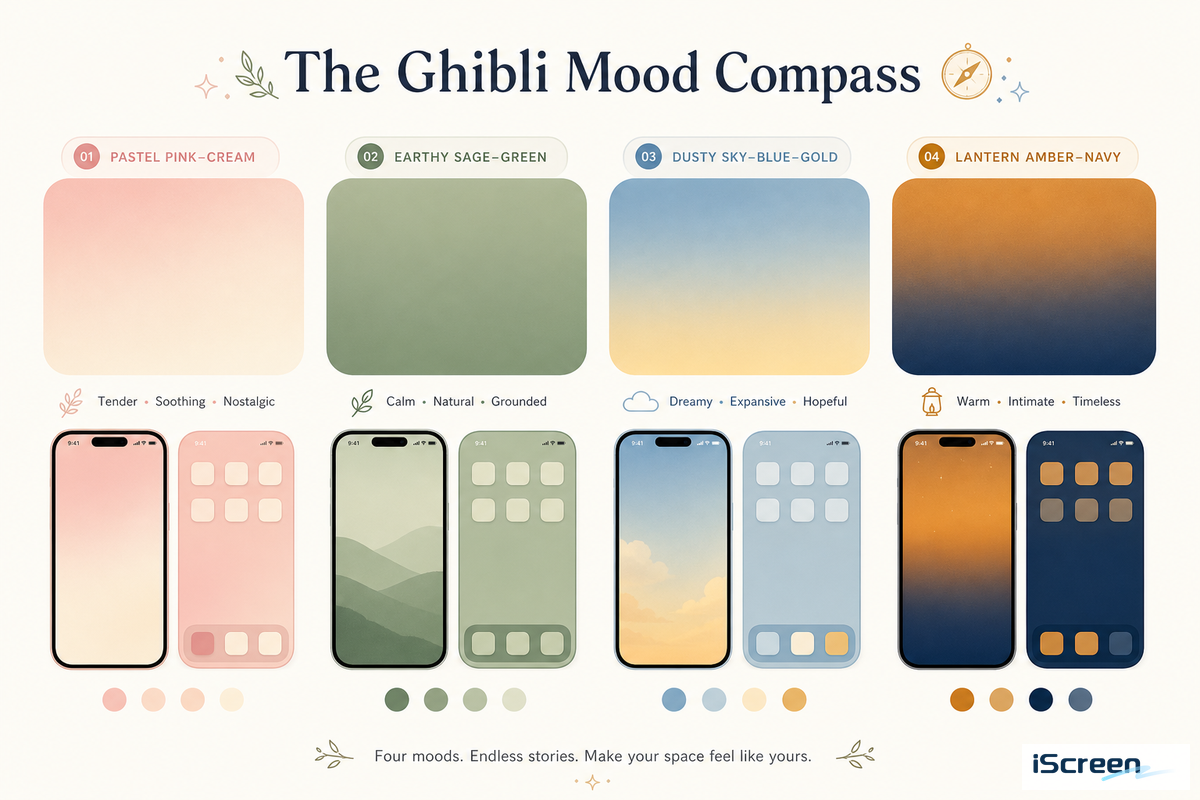
Most of studio ghibli’s filmography has four main moods-light, pastel and often pink (Kiki’s Delivery Service, Ponyo), brown earth, cool-toned forest(My Neighbor Totoro, as well as Princess Mononoke’s wolf-god forest), theatrical sky(Howl’s Moving Castle), and lanterned night(Spirited Away). The key to a look and feel that appears designed, not assembled, is to pair a mood with your current icon and widget colors, instead of grabbing any scene with recognizable ghibli characters at random.
Anyone running a broader studio ghibli iphone or ghibli iphone wallpaper search will find that most studio ghibli phone wallpapers fall into one of these same four moods.
| Mood | Representative Film(s) | Pairs Best With | Works Best On |
|---|---|---|---|
| Pastel-soft | Kiki’s Delivery Service, Ponyo | Rounded, cream or white icon packs | Home Screen |
| Earth-toned forest | My Neighbor Totoro, Princess Mononoke | Muted green, outline icons | Home Screen |
| Dramatic sky | Howl’s Moving Castle | Minimal, light-colored icons | Lock Screen |
| Lantern-lit night | Spirited Away | Dark-mode, warm-accent icons | Lock Screen (AMOLED-style panels) |
A dramatic-sky ghibli iphone setup built around Howl’s blue cloud scenes reads very differently from a lantern-lit Spirited Away pick, which is exactly why matching mood to film matters before browsing further. Princess Mononoke rarely shows up in wallpaper search data on its own, but its forest-and-wolf imagery reads as a natural extension of the Totoro earth-tone mood rather than a separate category, a pairing worth keeping in rotation for anyone who wants a calmer, nature-first home screen. For a broader look at aesthetic vocabularies beyond ghibli specifically, see our iPhone wallpaper aesthetic guide, which maps twelve style categories and their color anchors.
The 5 Studio Ghibli Films People Actually Search For
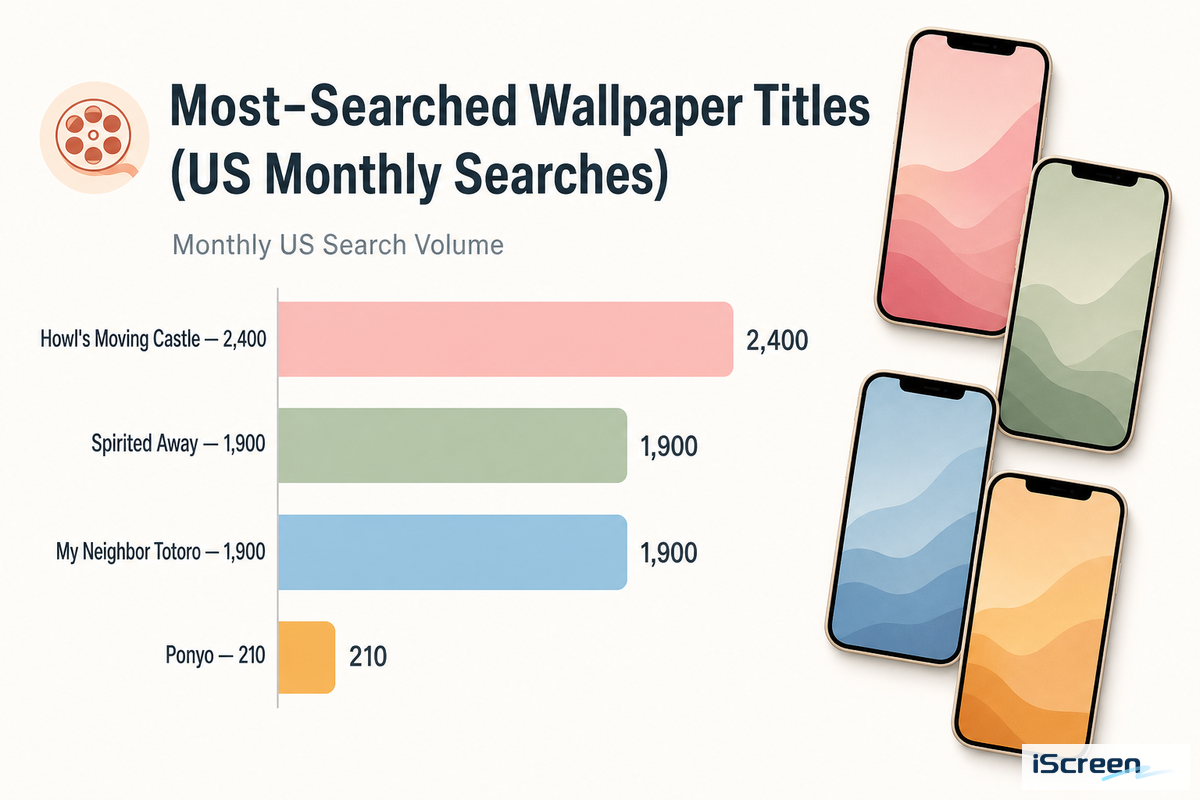
Of studio ghibli movies, the highest iphone-wallpaper searches in the U.S. go to Howl’s Moving Castle, at 2,400 searches per month (Spirited Away and My Neighbor Totoro each clock in at 1,900 searches; Ponyo’s just at 210). That U.S. wallpaper-search order doesn’t have much to do with Box Office results in ghibli’s native country-in fact, Spirited Away is the highest-grossing Japanese movie of all time, taking in 31.7 billion domestically.
While those are two figures from different countries and not exactly equal, it points to movies that play well as a phone background-think big, bold silhouettes, wide, endless skies-rather than those that simply did the best at the movies.
| Type | Category | Search Volume / Signature Trait | Best Screen |
|---|---|---|---|
| Film | Howl’s Moving Castle | 2,400/mo — golden-hour clouds with castle silhouette | Lock Screen |
| Film | Spirited Away | 1,900/mo — night train over dark water | Lock Screen (AMOLED-style) |
| Film | My Neighbor Totoro | 1,900/mo — rain-soaked bus stop | Home Screen |
| Film | Princess Mononoke | Niche standalone term — San and the forest wolf god | Home Screen, earth tones |
| Film | Ponyo | 210/mo — ocean wave chase | Home Screen, pastel |
| Style | Aesthetic / mood-board | 140/mo — curated color-and-composition sets | Home Screen |
| Style | Minimalist | 110/mo — single-subject, high negative space | Home Screen |
| Style | Landscape | 110/mo — wide scenery, minimal characters | Lock Screen |
| Style | Cute / character close-up | 110/mo — Totoro, Jiji, or Calcifer front and center | Home Screen |
Which Studio Ghibli movie has the most iPhone wallpapers?
According to search volume, “Howl’s Moving Castle” takes the crown for most-searched Studio Ghibli wallpaper, though “most wallpapers available” isn’t the same signal as “most searched”: searching a specific character name, such as Totoro or Calcifer — both anime characters instantly recognizable outside Japan — brings back a very different result than searching the film title itself.
A Spirited Away iPhone wallpaper search and a Totoro one turn up very different crops, but both — the bus stop and the night train — lend themselves well to iPhone’s tall 19.5:9 screen ratio without losing any sense of composition and have been shared widely for years by Reddit communities devoted to those movies. The best material from Howl’s Moving Castle, on the other hand, is often a vast expanse of sky that will take much less trimming, but offers much less space to place additional icons.
Static or Live? Setting Ghibli Wallpaper the Right Way
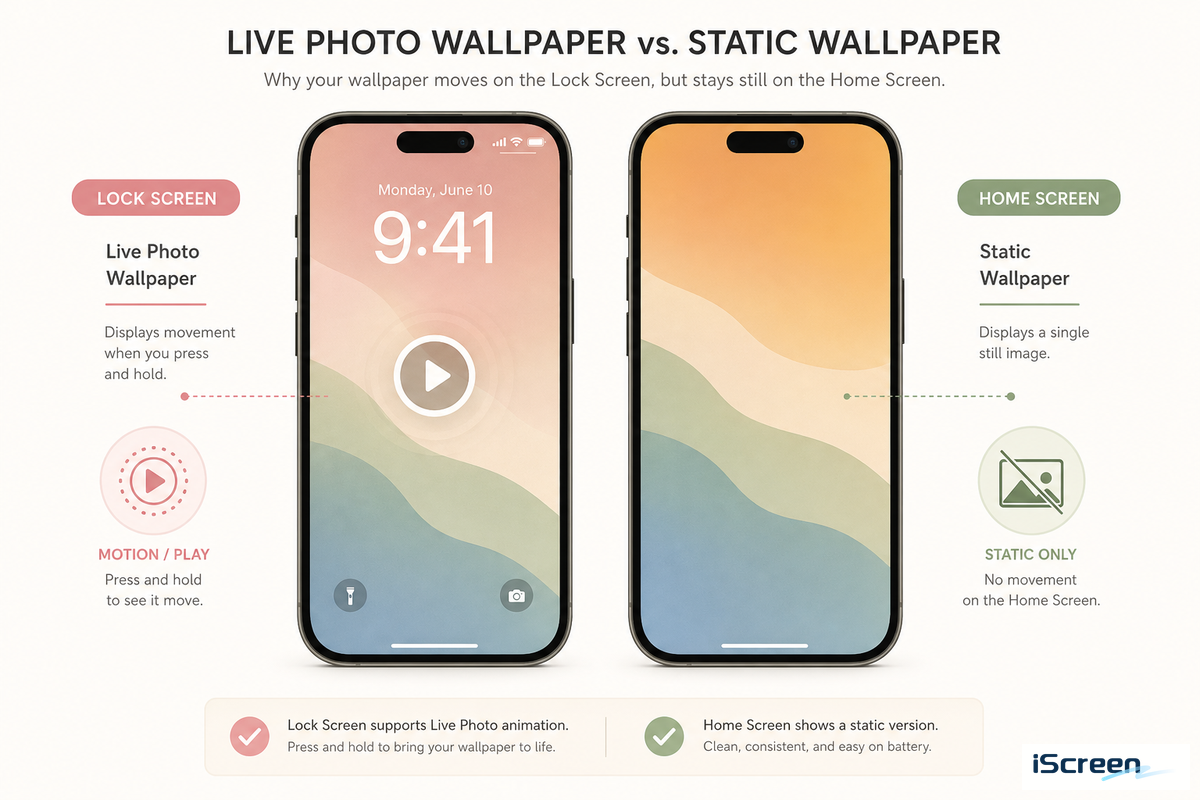
The cost if battery is the only consideration is far less than it may sound – according to one 2023 independent study, an iphone 14 Pro using Always-On Display along with the Live Photo wallpaper lost about 0.8 percent of its charge each hour – noticeable over a full day, not dramatic, though you might find the number slightly higher (or lower) on other hardware or newer iOS releases. Still, one drawback will be in place regardless of battery drain – Apple explicitly labels the Live Photo wallpaper feature for the Lock Screen and notes that the movement begins “whenever you tap and hold to wake up or activate your screen” rather than animating in a constant loop like some live-wallpaper apps do on Android. A ghibli live wallpaper iphone setup follows the exact same tap-to-wake behavior described above.
Configure it on your Lock Screen, but that’s it: Your Home Screen will be static no matter which wallpaper type you choose.
- Gives the scene a tiny jolt when you come back to it – ideal when there’s wind/rain/floating castle.
- Less used than static wallpaper, makes it stand out in any default build.
- battery cost small enough to be negligible for typical use (~0.8%/hr)
- Lock Screen only – not supported by Apple on Home Screen
- You’ll need a Live Photo or a short clip – not just a flat photo.
- Wake on motion, won’t stay active constantly at the background.
If you want to get a fuller analysis of live-wallpaper formats, other sourcing than ghibli, consult our live wallpapers for iphone, decision matrix of the four live wallpaper formats compared one by one. Both formats can be set up using iScreen’s full customization guide, which walks through both the Lock Screen and Home Screen setup flow in detail.
Turn Your Own Photos Into Ghibli-Style Art (Then Set Them as Wallpaper)
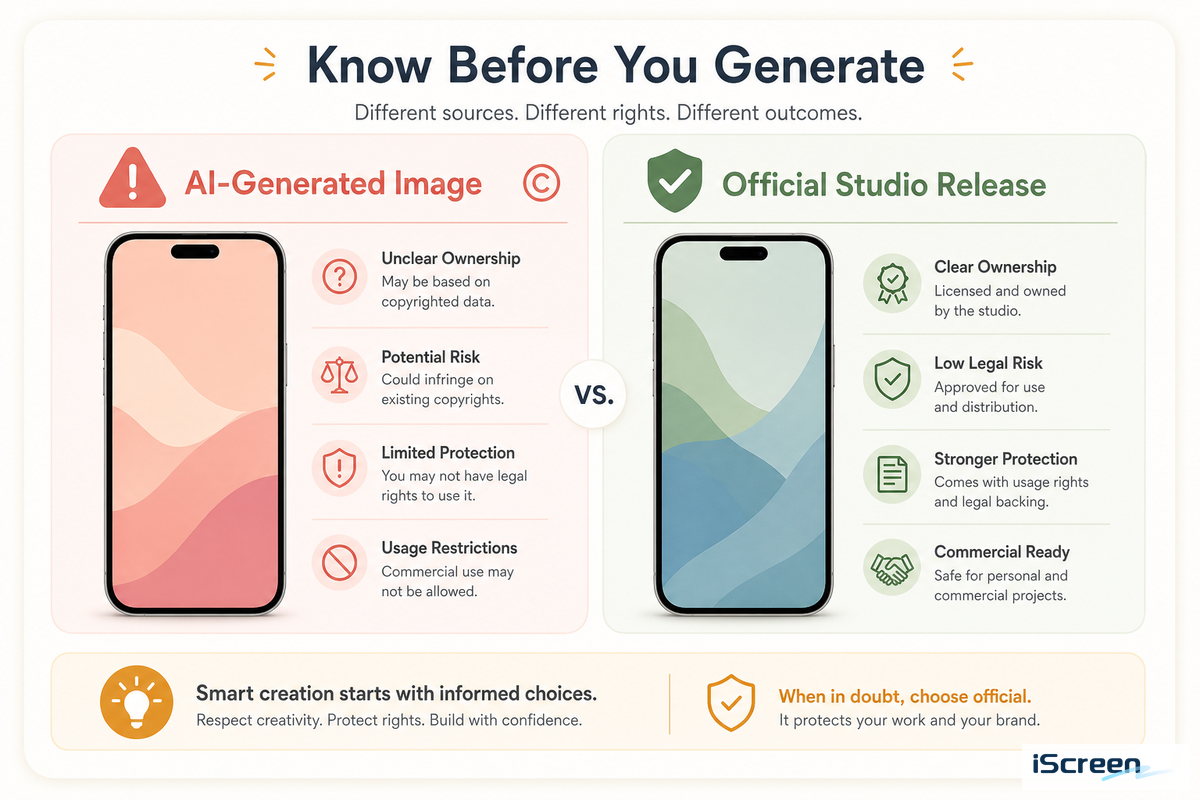
An AI Ghibli-style photo isn’t just turning your favorite snap into a Hayao Miyazaki cartoon via an image-generation model – which is a completely different process from downloading a premade studio ghibli wallpaper, and you should know about it honestly before jumping in. OpenAI’s ChatGPT photo generator blew up in March 2025 because of exactly that – transforming personal photos, memes and portraits into Ghibli images seemingly over night – sparking ongoing questions around AI and copyright. While Studio Ghibli itself has made no official public statement about the trend, its fanbase was quick to weigh in, with r/ghibli implementing a long-standing policy banning AI-generated art which members loudly reinforced. As of November 2025, the dispute had evolved far beyond stills, with Japanese CODA (content industry association, with members like Studio Ghibli, Bandai Namco, and Square Enix) lodging a written appeal to OpenAI on Oct 27, 2025, requesting that they refrain from using their members’ content for training new Sora video generation models without permission – a separate and later development related to video, not the March photos.
“In cases, as with Sora 2, where specific copyrighted works are reproduced or similarly generated as outputs, CODA considers that the act of replication during the machine learning process may constitute copyright infringement.”
— CODA (Content Overseas Distribution Association), written request to OpenAI, October 27, 2025
There’s also a second important aspect beyond the specific claims made by studio ghibli about the trend: The U.S. Copyright Office guidance on AI and copyright notes that images generated solely by prompts are not eligible for copyright protection at all – meaning your AI-ghibli-style photo may not legally be yours as a protected work if you were considering licensing or selling it rather than simply using it as your own wallpaper.
If you’ve already got a ghibli-style image that’s been created with AI and you just want to use it as your phone Lock Screen or Home Screen, the process is exactly the same as it’s for any personal photo: simply save the image to your phone’s camera roll, then go to Photos > Photo Shuffle in iScreen’s wallpaper library settings, or directly via iphone wallpaper settings.
Where to Find Free, High-Quality Ghibli Wallpaper (Without the Sketchy Downloads)
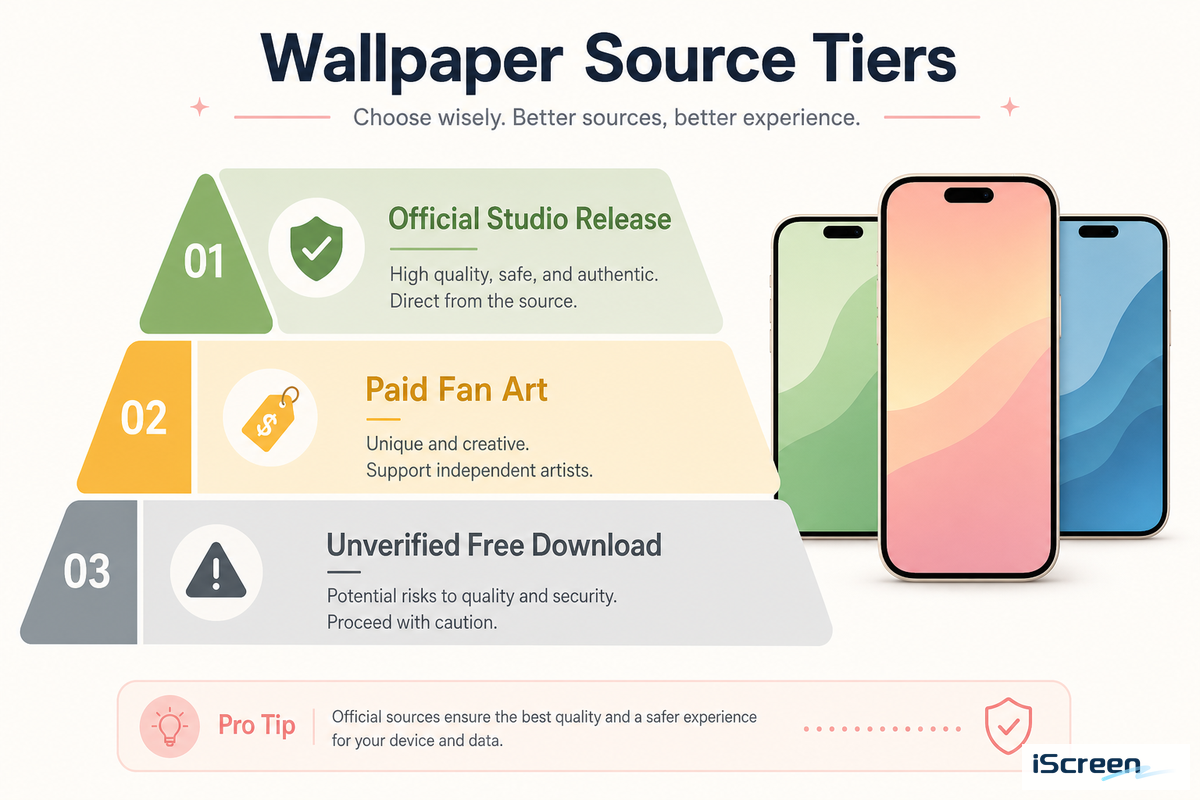
Ghibli wallpaper sources split into three tiers: unlicensed screenshot sites with no source information, Studio Ghibli’s own official scene-photo library published on its own website, and paid fan art on Etsy. Most fans default to the first tier without knowing the second exists — check the source before you check the resolution.
Many of the sites that offer “free Ghibli wallpaper” actually offer curated screenshots with no information about the source or license – this isn’t necessarily illegal but is a different thing than what studio ghibli itself offers. Studio Ghibli has also published hundreds of official scene photos from a number of films on its own website, with broad “common sense” personal-use permissions for many, and also offers a more limited release specifically for video-conference backgrounds. Most fans have no idea these resources exist – a Reddit post to the official page still elicits gasps years after it was first published. A third tier sits in between: individual artists on Etsy sell curated Ghibli-inspired wallpaper sets for $1.20 to $5.00 each, which is at least transparent about being paid fan art rather than official material. Whether you’re chasing a studio ghibli wallpaper free download, a Studio Ghibli Wallpaper phone upload in hd, or comparing studio ghibli wallpaper reddit threads against the official releases above, the pattern holds across all three tiers.
-
✔
studio ghibli’s own scene photos (ghibli.jp) – for personal use with permission, according to studio terms. -
✔
Fan art or curated sites which clearly state the source movie and frame without claiming it as their own original artwork. -
⚠
Anonymous “Free wallpaper” Download-Grids – Treat as Fan Content Only; Unverified Sources – 12.
Studio Ghibli Wallpaper Sizes: What Actually Fits Your iPhone
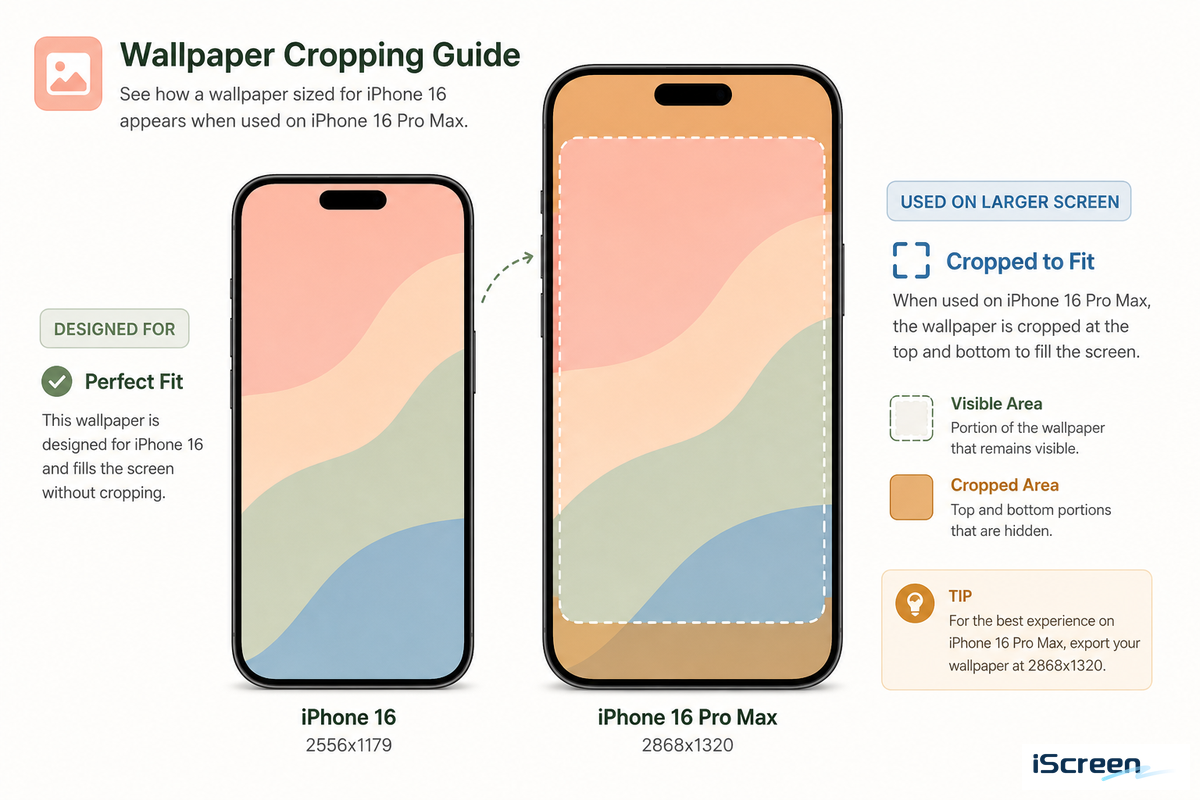
iphone 15 and iPhone 16 use a 2,556-by-1,179-pixel display at 460 ppi, a 19.5:9 iphone ratio, according to Apple’s published specifications — the number to check before downloading anything labeled “4K” or “HD” without a stated resolution. The larger iPhone 16 Pro Max steps up to 2,868-by-1,320 pixels on its 6.9-inch panel, still at 460 ppi, so a wallpaper sized for the base model will crop differently on the Pro Max rather than simply stretching to fit. Check Settings > General > About on your device for the precise figure before tightly cropping a picture. A file marketed as ghibli wallpaper 4k or a plain studio ghibli wallpaper download link should still be checked against your model’s actual pixel count — a Studio Ghibli Wallpaper 4K phone image built for a Pro Max will look oversized and soft on a base model instead of sharp.
A wallpaper that appears blurry on iphone is more likely a settings problem than a resolution one. A common pattern in Apple’s own support threads: someone downloads a properly-sized Ghibli image, sets it, notices a blurry strip at the top of the screen, assumes the file was low quality, deletes it, and re-downloads a supposedly sharper version — only to see the exact same blur again. Two causes turn up again and again in those same discussions: the Reduce Motion accessibility setting can create that blurry crop at the top of the screen, and a bug that first appeared in iOS 17 “extend wallpaper” can produce the identical result regardless of image quality.
Going to Settings > Accessibility > Motion before concluding a download was poor quality resolves the problem far more often than re-downloading a higher-resolution version of the same file.
Build a Full Ghibli Theme, Wallpaper + Icons + Widgets Together
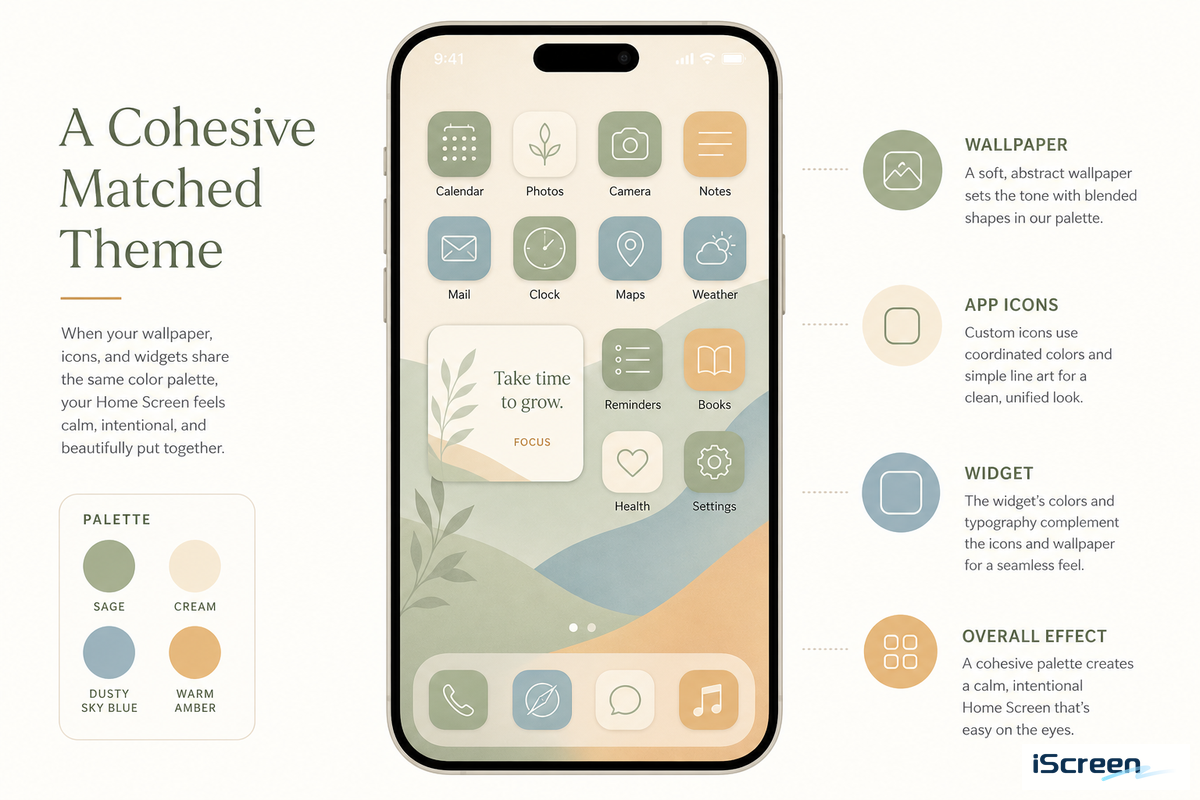
A wallpaper on its own serves as decoration, and the mismatch shows fast: a soft, hand-painted Ghibli scene sitting behind sharp neon or glossy 3D icons looks jarring within seconds of unlocking the phone, which is the single most common way a Ghibli-themed setup ends up feeling unfinished rather than intentional. Pairing the wallpaper with matching icons and widgets instead creates a cohesive theme where nothing fights for attention.
Four steps apply no matter which Ghibli film or mood you start from:
- Select one of the ghibli Mood Compass modes from above and make it your Lock Screen or Home Screen wallpaper.
- Browse iScreen’s icon library for a pack that complements your wallpaper’s color palette, such as Ponyo’s rounded, pastel icons or Totoro’s muted, outline icons.
- Incorporate a matching widget or two, for weather, perhaps, or the time, instead of cluttering every available slot; a busy screen defeats the clean, calming aesthetic ghibli’s art is famous for.
- Live with the combination for at least a week before judging it — a scene that looks too plain on day one often becomes the favorite after 7 days of daily use — then save it as a theme you can reapply later, and check Dynamic Island styles if your phone supports it.
How Long Will the Ghibli Wallpaper Trend Last? (Lock Screen + Outlook)
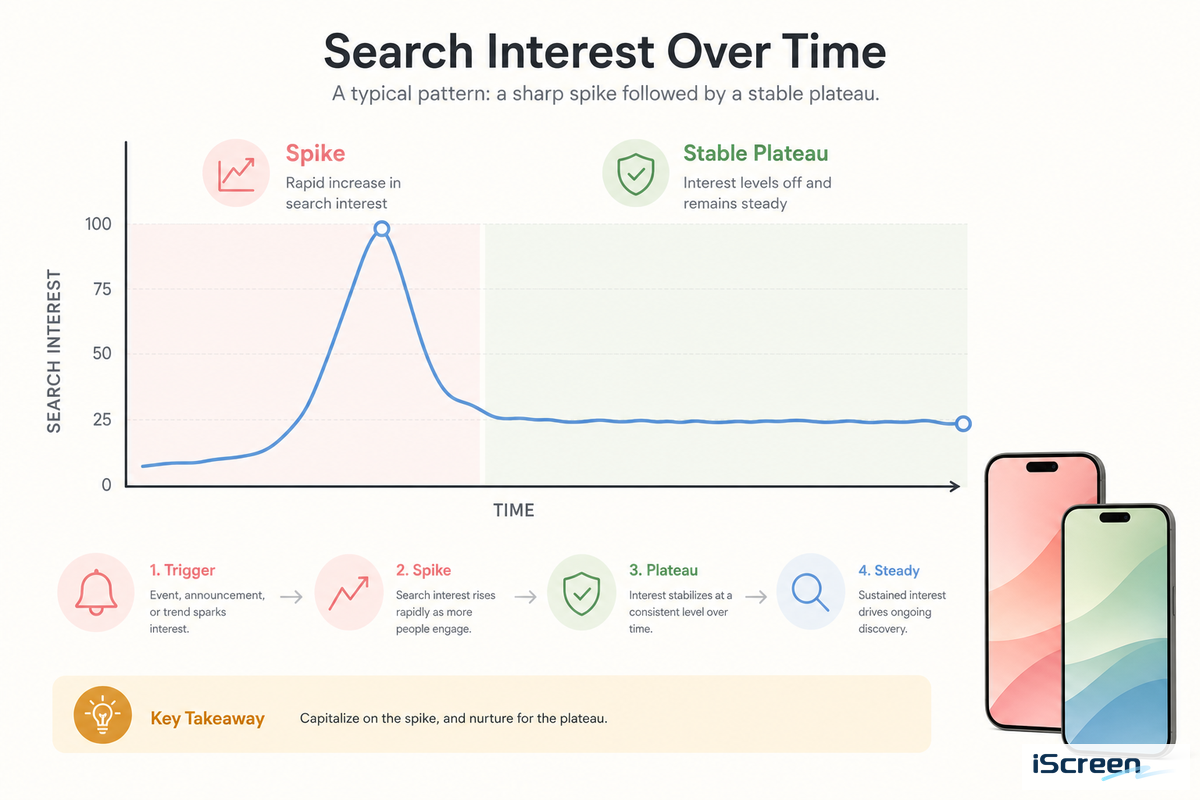
Interest in the term studio ghibli wallpaper increased by 80% in September 2025, before stabilizing in a 590-880 average from October 2025 through mid-2026 — a pattern that looks like persistent fan interest rather than a one-off fad, even as the wider ghibli-wallpaper category has pulled back 59% compared with its level 2-3 years earlier.
Both of these developments are possible: a former wave of general ghibli-wallpaper interest has passed its high point, while a more recent and narrowly focused wave (partly fueled by the AI filter trend above) adds fresh searches to a smaller, still active base.
Keeping a Ghibli scene on rotation with one or two others for your Lock Screen (rather than selecting a single favorite permanently) generally keeps your look current no matter where broader trends go.
Key Factors to Consider
- Make your wallpaper mood fit the icon and widget colors before you choose a specific film
- Live Photo wallpaper only works on the Lock Screen and will use a bit of battery (~0.8%/hour).
- studio ghibli releases its own art; don’t assume all the download results you find online are unlicensed fan work.
- Make sure you know the exact resolution of your iphone before you trust a “4K” listing.
Q: How do you convert a photo into Ghibli style on iPhone?
AI image-generation apps and tools like ChatGPT’s image feature can restyle a personal photo as Ghibli-inspired art directly on iPhone, then save the result as a wallpaper file.
Q: Is Ghibli wallpaper free to use, or does it violate copyright?
Studio Ghibli releases some official scene photos for personal use, but most “free Ghibli wallpaper” sites are unlicensed fan screenshots with no stated source or permission.
Q: Can iOS have a moving or live Ghibli wallpaper?
Yes, as a Lock Screen Live Photo that animates when you wake the device, not as a continuously looping Home Screen animation, since Apple treats the two screens differently.
Q: What’s the best app for Ghibli-style wallpaper?
Your best option depends on whether you want to download existing fan-made art or generate a new AI-styled image, not a single universal answer for every use case.
Q: Which Studio Ghibli movie has the most searched wallpaper?
Howl’s Moving Castle leads at roughly 2,400 monthly US searches, narrowly ahead of Spirited Away and My Neighbor Totoro at about 1,900 each in our tracked data.
Q: How long will the Ghibli wallpaper trend last?
Search data suggests durable long-tail interest rather than a short-lived fad, despite a broader multi-year cooldown across the wider wallpaper-trend category seen in search volume overall.
References & Sources
- Change your iPhone wallpaperApple Support
- Create a custom iPhone Lock ScreenApple Support
- iPhone 16 Technical SpecificationsApple Support
- iPhone 16 product specifications pageApple
- Studio Ghibli scene photo releaseStudio Ghibli official site
- Studio Ghibli web-meeting wallpaper releaseStudio Ghibli official site
- Test Shows How Much Battery Drain Your Wallpaper CausesMacRumors
- OpenAI’s viral Studio Ghibli moment highlights AI copyright concernsTechCrunch
- CODA Issues Written Request to OpenAI Regarding Sora 2Content Overseas Distribution Association (primary source)
- Studio Ghibli and other Japanese publishers want OpenAI to stop training on their workTechCrunch
- Chihiro Leads the Way: A Box Office Ranking of Studio Ghibli FilmsNippon.com
About This Analysis
To arrive at the search-volume comparison and trend data for this article, we used our in-house keyword-research tools. This data was supplemented by information found on Apple’s public specifications page, the studio ghibli website, and reporting in the press about the 2025 ghibli filter story. When an aspect of this trend couldn’t be verified by an external source (e.g., searches specifically for desktop Ghibli wallpaper), we didn’t include it in this article.
Related Articles
- Pastel Wallpaper for iPhonea softer aesthetic pairing for Ponyo and Kiki’s Delivery Service moods
- Y2K Wallpaper for iPhonea contrasting style if Ghibli’s calm palette isn’t the right fit
- Coquette Wallpaper for iPhoneanother pastel-adjacent aesthetic worth comparing against the Mood Compass above
- Aesthetic iPhone Home Screen Ideasbroader home screen inspiration beyond a single film aesthetic