
.png)
Halloween Backgrounds for iPhone: Ideas by Style, from Cute to Creepy
Updated August 2026 · Reviewed by the iScreen team
Halloween backgrounds for iPhone are available in more ways than a cheesy Halloween landscape with pumpkins and bats: packs of soft, colorful cutes, spooky poster art styles, gothic mansion settings, and full horror scenes each render differently on a Lock Screen. This guide classifies the entire range of available art by look before explaining what the gallery pages omit: the file size that will match your iPhone model, scheduling the swap to match demand, understanding legally free backgrounds, and making sure the time stays visible over spooky images.
Halloween backgrounds for iPhone peak as a search on a strict calendar: US demand climbs from 12,100 queries in August to 110,000 in October, then collapses to 1,900 by November. Set yours in early September, pick a style lane before you scroll, and match the file to your model’s resolution, such as 2622×1206 px on iPhone 17.
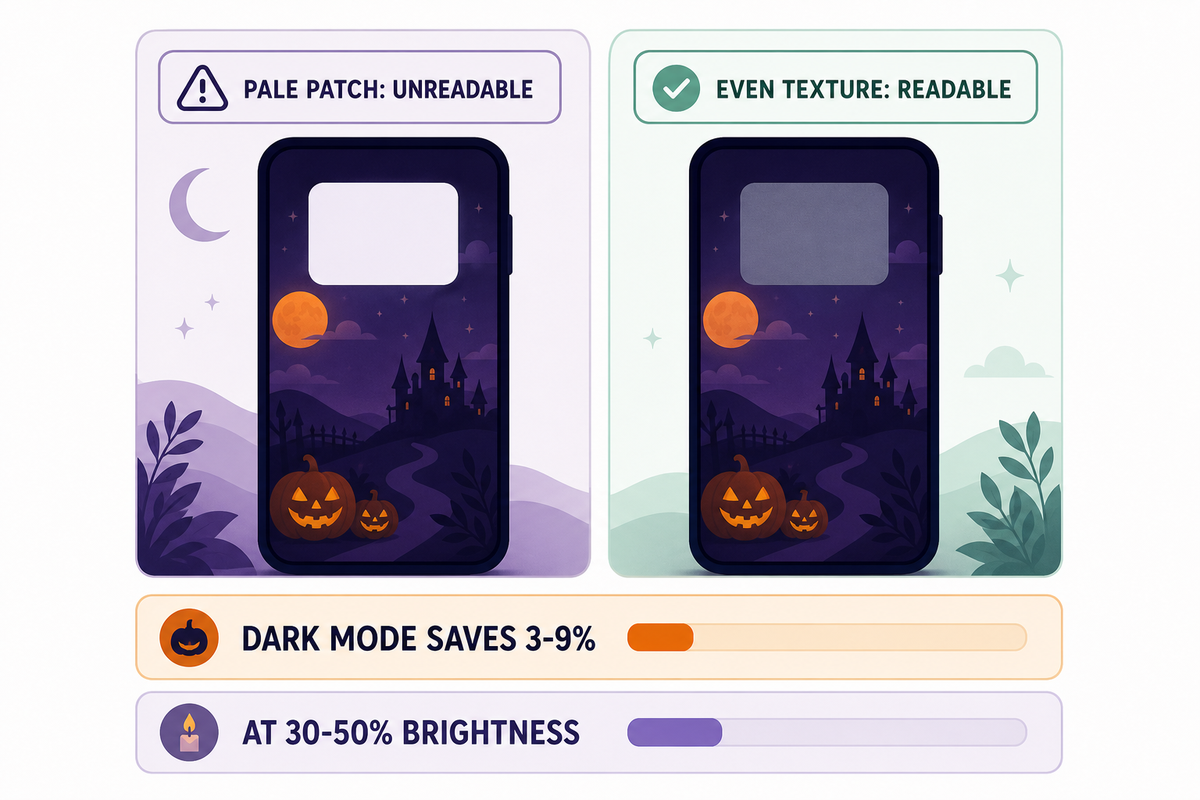
- A dark wallpaper isn’t a battery plan: according to Purdue University research, switching to dark mode saves only 3-9% at 30-50% brightness, and that tested whole interfaces, not wallpapers.
- 89% of the year’s searches for this term land between September 1 and October 31, so a late start wastes most of the season.
- No single file size fits every iPhone: recent models span 2556×1179 to 2868×1320 px, all at 460 ppi.
- Free download and free reuse are different rights; CC0 collections allow both, most galleries allow only the first.
- Photo Shuffle can rotate a whole spooky set for you: On Tap, On Lock, Hourly, or Daily.
The 61-Day Window: When Halloween Wallpapers Pay Off
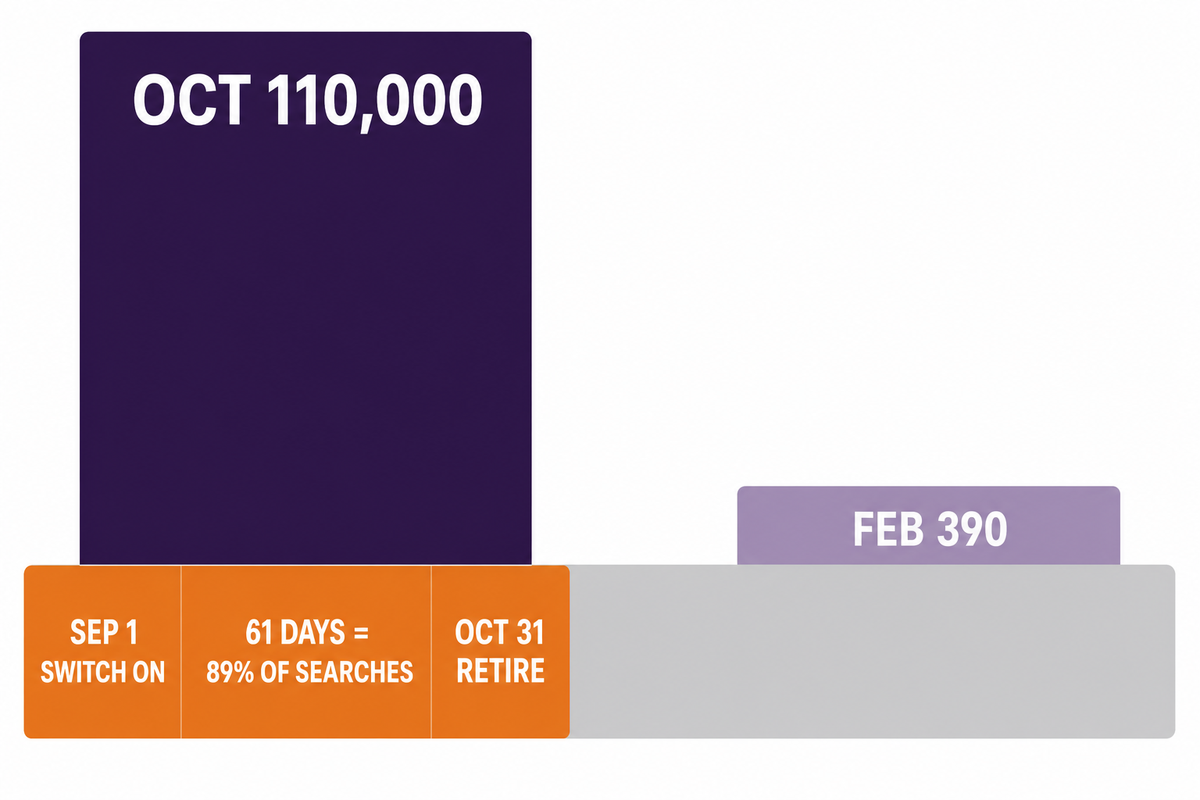
The 61-Day Window is the stretch from September 1 to October 31 when 89% of the year’s US searches for Halloween backgrounds happen, a share derived from bucketed monthly ad-platform volumes and best read as an estimate rather than a census. Demand data from this run’s Google Ads dataset puts October at 110,000 monthly queries against 390 in February, a 282x swing that makes timing the single cheapest decision in this whole topic.
Worried that late August is too early to go spooky? The numbers say the opposite. Spooky season, as the search graph defines it, opens in August: the month already carries 12,100 searches, September jumps to 60,500, and the crowd you would be “too early” for is measurably already there. The real mistake sits at the other end: after October 31 the audience vanishes within days, and a jack-o-lantern Lock Screen in mid-November reads as neglect, not festivity. Swap on September 1, retire it November 1, and queue a fall backgrounds for iPhone set for the shoulder weeks.
| Month | US searches | What it means |
|---|---|---|
| August 2025 | 12,100 | Early adopters start |
| September 2025 | 60,500 | The window opens |
| October 2025 | 110,000 | Peak month |
| November 2025 | 1,900 | Collapse after the 31st |
| December 2025 | 720 | Holiday sets take over |
| January 2026 | 590 | Off-season floor |
| February 2026 | 390 | Annual low |
| March 2026 | 590 | Flat |
| April 2026 | 590 | Flat |
| May 2026 | 480 | Flat |
| June 2026 | 720 | First stirrings |
| July 2026 | 2,900 | Planners arrive |
The phone screen rides a wider wave of seasonal decorating. The National Retail Federation’s 2025 consumer survey of 8,045 people projects a record $13.1 billion in Halloween spending, with 73% of consumers celebrating and $4.2 billion going to decorations alone. A wallpaper is the zero-dollar corner of that budget, and the platform is leaning in: MacRumors reports that iOS 27 is expected to generate wallpapers with AI through Image Playground, so the find-a-file era is slowly turning into a make-your-own era. If you’re reading this in season, act inside the window; the calendar doesn’t wait for perfectionists.
Across the twelve months in the table above, the phrase averages about 15,960 searches a month, against 28,100 three years ago in the same dataset, a drop of roughly 43%. It still spikes greatly every October; the wedge is just moving toward newer phrasings, one more reason to ride the peak rather than the tail.
The Scare Scale: Pick Your Style Lane Before You Scroll
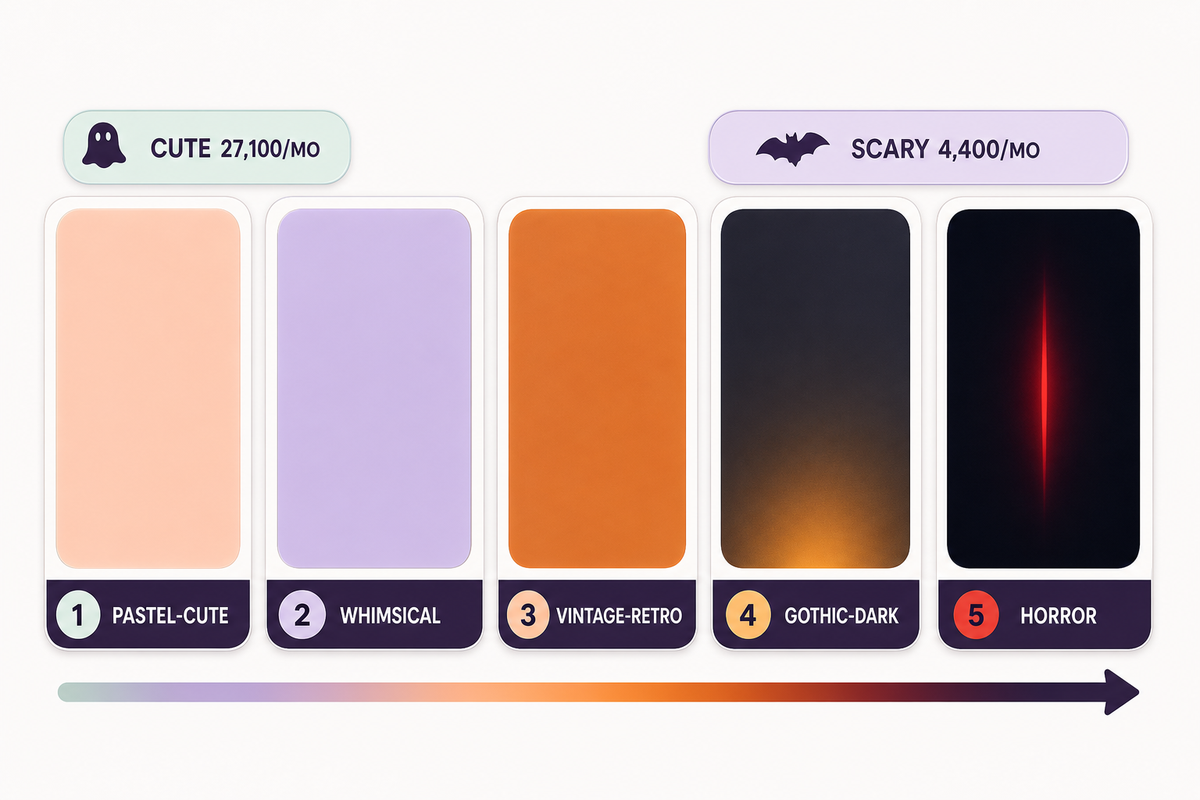
The Scare Scale represents a five-notch axis to classify each style of Halloween wallpaper by scariness: 1 pastel-cute, 2 whimsical, 3 vintage-retro, 4 gothic-dark, 5 horror. Search volume is quite unevenly distributed across it, with just cute terms alone pulling in 27,100 monthly searches, so knowing your notch before starting a Halloween-ready iPhone wallpaper collection saves lots of time scrolling through galleries.
Pinterest boards related to this topic extend to over 900 pins apiece, with titles such as “88 Top Halloween wallpaper iPhone ideas”, endless itemized listings in the board footer suggesting there are even more ideas to explore for Halloween screens, and the #1 board answers no questions at all except “do you like this one.” A notch number allows for sorting where a gallery can’t: select 1-2 if you plan to use your phone as a work tool during meetings, 3 if you want the aesthetic without the scare, 4-5 if you’re actually after the scare. Each row of styles below carries a clock-zone risk column, because the most visually pleasing pieces in the set can still bury your Lock Screen clock, a dark-style problem addressed in the dark-styles category. Treat the table as an exploratory tool, not a list of rankings.
| Style | Notch | Palette | Signature motifs | Clock-zone risk | Best screen |
|---|---|---|---|---|---|
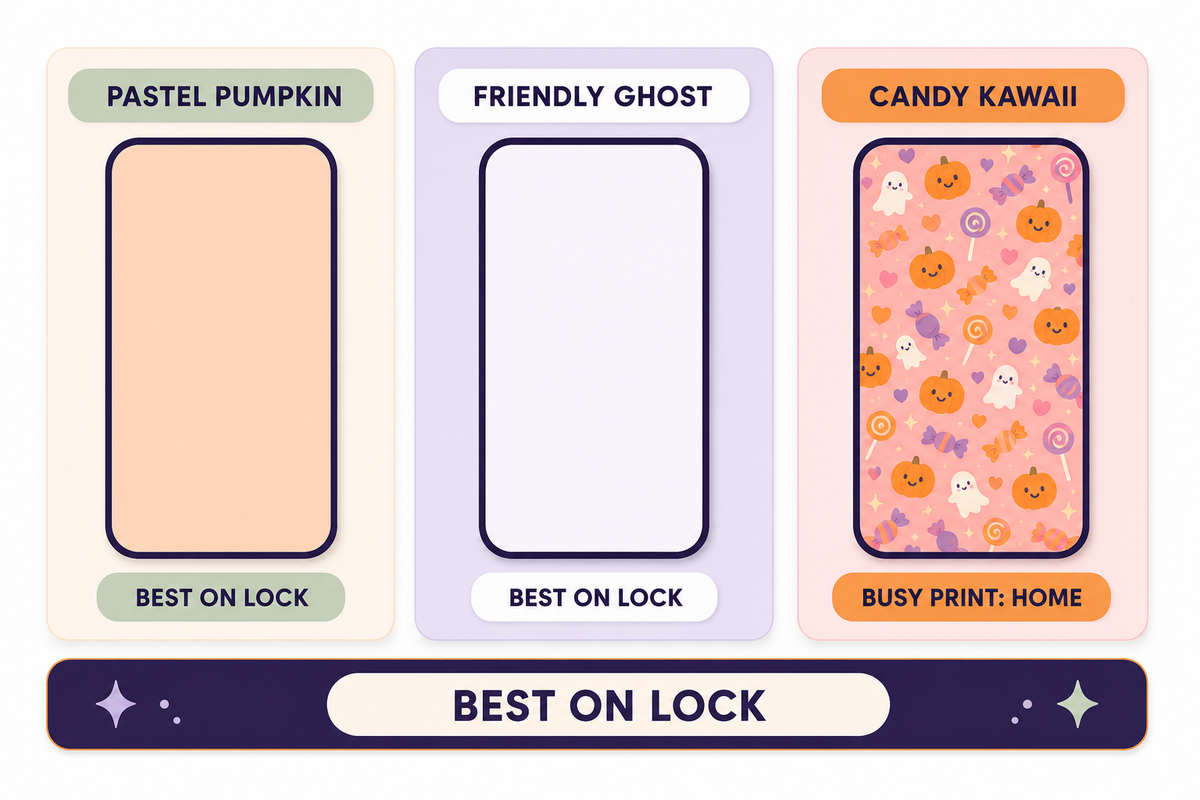
| Pastel pumpkin patch | 1 | Peach, cream, sage | Cute pumpkins, bows | Low | Lock or Home |
| Friendly ghost | 1 | White on lavender | Smiling ghost, stars | Low | Lock |
| Candy kawaii | 1 | Pink, orange pops | Candy corn, hearts | Medium, busy print | Home |
| Whimsical witchy | 2 | Plum, moon gold | Witch hats, cats, moons | Medium | Lock |
| Preppy pattern | 2 | Pink, lime grid | Smiley ghosts, checker | Medium, busy print | Home |
| Vintage poster | 3 | Burnt orange, black | 1950s cats, paper grain | Medium | Lock or Home |
| Retro film | 3 | Faded teal, rust | VHS grain, moon titles | Medium | Lock |
| Purple neon | 4 | Violet, electric green | Neon skulls, fog | Low on dark base | Lock |
| Gothic manor | 4 | Charcoal, candle amber | Manor, ravens, gates | High near sky areas | Lock |
| Horror silhouette | 5 | Black, blood red | Silhouettes, creepy forest | High | Lock, dark base |
Search habits agree with the division: 27,100 monthly US searches for the cute term by itself, against 4,400 monthly scary searches for a cluster of terms and 8,100 monthly aesthetic searches for a different cluster of terms, so just search demand for notch 1 by itself surpasses all the search demand for notches 4 and 5 combined.
Cute Halloween Backgrounds for iPhone: Pastel Pumpkins, Friendly Ghosts and Candy Palettes
Adorable Halloween wallpaper is the dominant style lane, with the head term counting 27,100 monthly US searches, and the broader cute grouping peaking at 201,000 in October 2025. Anyone abstaining because a pumpkin is too juvenile is fighting against the largest bloc of adult searchers in the category.
Three sub-directions cover most of notch 1, and each one is its own well of inspiration. Soft pastel pumpkin scenes leave a gentle space in the saturation spectrum, somewhere around soft peach and sage, while friendly ghost graphics give one mascot image with wide margins, the easiest kind of image to crop. Candy kawaii cute prints fill every edge of the frame with candy corn and hearts, and look fabulous on the Home Screen grid, but battle Lock Screen widgets for viewer attention. When searching, skip the general head term, and type the sub-style plus a color word, “pastel ghost lavender” style. Broad searches for “halloween wallpaper cute” or “cute Halloween iPhone wallpaper” bring up the same 30 crowded boards every year.
A boundary worth remembering: busy kawaii prints lose their charm behind app icons once icon labels overlap the pattern. Save cute images for the Lock Screen, or combine them with a quieter Home Screen base, the split covered in the setup section. Cute sets also age fastest socially; a bow-scarfed pumpkin in mid-November screams more off-season than any plain darker scene, so cute notch 1 users gain the most from the November 1st retirement day.
Lost in the delightful spooky-cute mash-up? Just one note: spooky cute Halloween wallpaper terms get only 880 monthly queries, but see a spike of 6,600 queries in October, the steepest rise in the cluster. A ghost with tiny fangs covers both moods in one image.
Scary and Dark Halloween Backgrounds That Stay Readable
Looking for dark wallpapers? Choose by appearance and contrast, not hope of battery life. Scary Halloween wallpaper terms, with autocomplete cousins like “scary backgrounds for iPhone”, gather an average of 4,400 monthly queries, reaching 40,500 in October, and all of those downloads run into the same two physics issues: the readability of the clock, and the myth that black pixels truly extend battery life.
Start with the battery issue, since it rules out nothing yet shapes many downloads. Research on OLED screens tested entire interfaces going from light to dark, not individual wallpapers, and the result certainly undercuts common wisdom:
“At 30%-50% brightness, Purdue researchers found that switching from light mode to dark mode saves only 3%-9% power on average.”
Those phones were Android models, the savings only reached 39-47% at full outdoor brightness, and a static wallpaper occupies a fraction of the pixels a full dark interface does. So a gothic manor scene earns its spot on mood alone, which is a good enough reason.
Readability is the half that actually bites, and the trap is judging a wallpaper by its average darkness. What matters is local contrast exactly where the clock, date and widgets land, not the overall tone. A mostly-black manor with one pale moonlit sky patch behind the clock digits fails harder than a mid-gray fog scene with even texture. One Apple forum poster described a bad pairing bluntly: “the lock screen is literally unusable”. Check the actual screen, not the thumbnail: apply the image, look at the clock digits and each widget slot, and if any sits over busy texture, drag the crop or pick again. Note that iOS 26 also blurs wallpapers by default when the Always-On Display dims; 9to5Mac documents the Always-On Display blur toggle under Settings, so your creepy forest may look softer on the dimmed screen than you expect.
Contrary to the “darker saves more” instinct, brightness habits set the ceiling: with indoor auto-brightness hovering near 30-40%, the measured dark-mode saving stays in that 3-9% band, thinner than one screen-on hour of normal usage. Choose notch 4-5 art for the eerie look; keep charging habits for the battery.
Aesthetic Halloween iPhone Wallpapers: Vintage, Preppy, Pink and Gothic Substyles
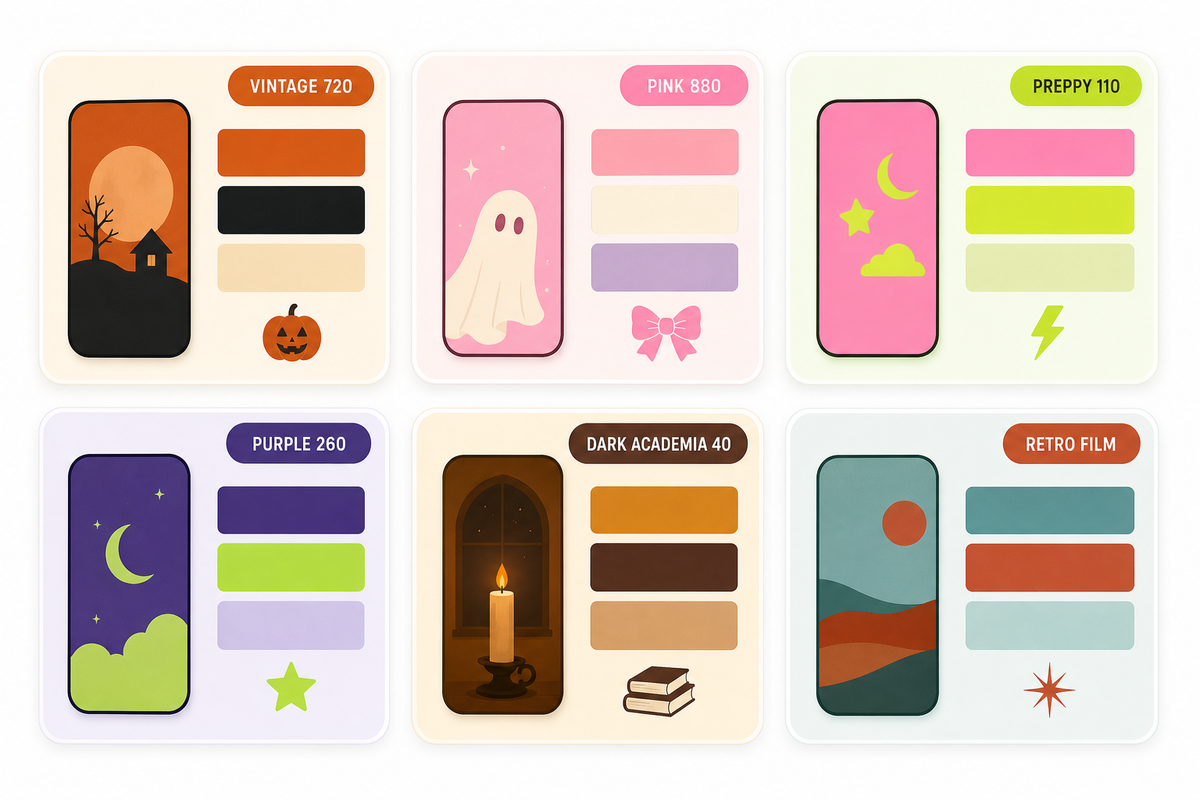
An aesthetic Halloween wallpaper differs from a random spooky image by holding one consistent visual language across color, motif and texture. The lane draws 8,100 monthly searches and hides six named substyles, each with its own precise search string that beats the generic term every time.
Use the substyle vocabulary as your search syntax and the results improve immediately. Vintage Halloween iPhone wallpaper, 720 monthly queries, gets you 1950s poster cats and paper grain. Pink Halloween aesthetic, 880 queries, is the kawaii-horror crossover that spiked 5,400 in October 2025. Preppy Halloween wallpaper iPhone, 110 queries, means smiley ghosts on checker grids. Purple Halloween aesthetic, 260 queries, delivers neon-on-violet. Dark academia Halloween, 40 queries, is candlelit-library moodiness, and retro film rounds out the set with VHS grain and faded teal. On Pinterest these travel as run-on tag chains, boards labeled “aesthetic Halloween wallpaper iPhone wallpaper spooky wallpaper fall wallpaper” style. The same grids get filed under Halloween wallpaper backgrounds one week and Halloween wallpaper iPhone backgrounds the next, which is why typing the named substyle into a wallpaper styles gallery finds in seconds what the tag soup buries. Scroll any lane long enough and you discover the repeat rhythm, the same 20 pins circulating, which is the strongest argument for the named search.
Design-side consensus for 2026 leans orange-black-purple as the core palette, with celestial and minimal variants rising, and OLED screens reward deep saturated bases with defined light zones. The visual approach you want should still be able to pass the same clock check as any dark piece – a few squares of cream on an old movie poster where the numerals are would put it in the same failure category as a gloomy graveyard. If you’re getting meager results when searching for that subtype that’s actually kind of the idea – there’s still opportunity at 110-query subcategories like “preppy” as of early October.
What Size Halloween Background Fits Your iPhone
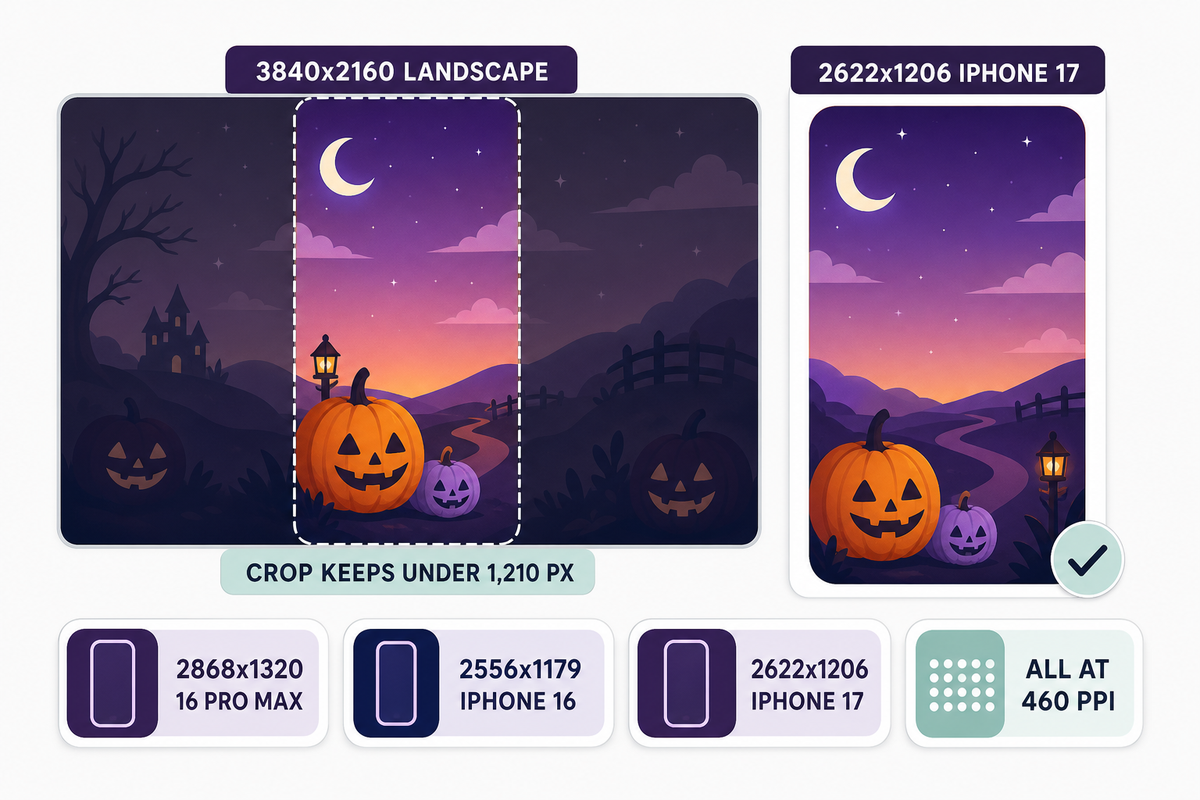
Wallpaper sizing has no universal answer: recent iPhones span four different resolutions across five models, from 2556×1179 px on the 6.1-inch iPhone 16 to 2868×1320 px on the 6.9-inch 16 Pro Max, every one at 460 ppi. Match or exceed your own model’s pixel grid and let iOS handle the crop.
| Model | Resolution | Screen | Density |
|---|---|---|---|
| iPhone 17 | 2622×1206 px | 6.3 in | 460 ppi |
| iPhone 16 Pro Max | 2868×1320 px | 6.9 in | 460 ppi |
| iPhone 16 Plus | 2796×1290 px | 6.7 in | 460 ppi |
| iPhone 15 Plus | 2796×1290 px | 6.7 in | 460 ppi |
| iPhone 16 | 2556×1179 px | 6.1 in | 460 ppi |
Worked example, iPhone 17: Apple’s iPhone 17 tech specs list a 2622-by-1206-pixel display at 460 ppi. A 2622×1206 px file maps one image pixel to one screen pixel; a 3000×1380 px file downscales cleanly; a 1440×2560 px gallery file falls 62 px short on the long axis and gets stretched. Two models sharing 2796×1290 px, the 16 Plus and 15 Plus, is the one overlap in this set, which still leaves four distinct grids and zero universal size. Find your own model’s line on Apple’s spec pages, such as the iPhone 16 Pro Max specifications or the iPhone 16 and 16 Plus specs, before trusting any download button.
Shape beats pixel count, which surprises people chasing 4K files. A 3840×2160 px “4K” image is a 16:9 landscape; an iPhone screen is roughly 1:2.17 portrait, so setting that landscape file means cropping away close to two thirds of its width and the phone shows fewer than 1,210 of those 3,840 horizontal pixels. Third-party size charts add their own noise; two of the 2026 size guides checked for this article list iPhone 17 at 2778×1284 px, a figure that appears on zero Apple pages. High quality here means the right shape at native resolution or above, saved as a clean image without recompression, not the biggest number in the filename.
Set It Up: Apply, Pair and Shuffle Halloween Wallpapers in iOS 26
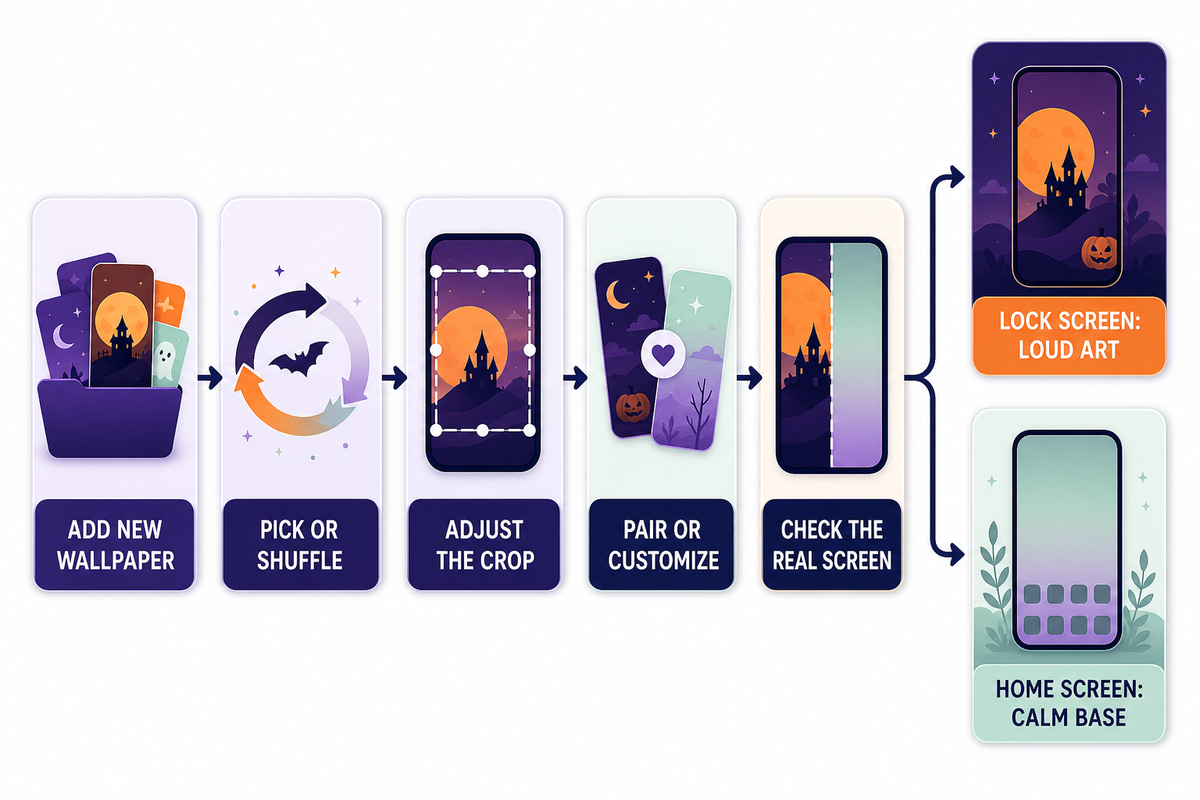
If setup anxiety has stopped you from touching a working Home Screen arrangement, iOS removes the risk: each new wallpaper becomes a separate saved Lock Screen you can switch away from or delete, with the old one untouched. Apple’s own change your iPhone wallpaper guide documents both entry paths.
Apply a Halloween background in under 2 minutes:
- Open Settings, tap Wallpaper, then tap Add New Wallpaper.
- Pick your saved Halloween image from Photos, or choose Photo Shuffle to select several.
- Pinch to adjust the crop until the clock sits over quiet texture.
- Tap Add, then choose Set as Wallpaper Pair or Customize Home Screen.
- Check the clock and widgets on the real Lock Screen, not the preview thumbnail.
The second route runs from the Lock Screen itself: touch and hold the screen to open your wallpaper gallery, swipe to any saved design, or tap the plus button for a new one. That gallery model is what makes the season easily reversible; on November 1 you swipe back to your regular set in about 5 seconds. For the full tour of crop, depth effect and per-screen options, the step-by-step in our guide to change your iPhone wallpaper goes deeper than this seasonal page needs to.
The pair choice is where one quiet rule earns its keep: put the loud art on the Lock Screen and a calm base behind your apps. The split works because app icons and their labels already crowd the Home Screen, so Customize Home Screen with a plain dark gradient keeps icons legible while the horror scene lives where nothing overlaps it. Screens serve different jobs; decorate them differently.
How Do I Make My Halloween Wallpaper Change Automatically?
Photo Shuffle rotates a set of images on a schedule you pick: On Tap, On Lock, Hourly, or Daily, per Apple’s iOS 26 wallpaper guide. Choose Photo Shuffle when adding a new wallpaper, select 5-10 Halloween images across your chosen notch, and set the frequency. Daily gives each image about 3 days of screen time across October; Hourly cycles the full set before lunch.
On iPhone 12 or later with iOS 26 you can also promote one favorite photo into a Spatial Scene, a depth effect that separates the subject from the background and shifts as you tilt the phone; Apple notes only certain photos qualify, and MacRumors’ Spatial Scenes walkthrough finds photos with one clear foreground subject convert best. A carved pumpkin at 1-2 m distance makes a perfect candidate; a busy group costume shot doesn’t. Prefer moving art instead? Animated options behave differently from static files, and our live wallpapers for iPhone guide covers that lane separately.
Free Halloween Backgrounds: Sources and What the License Lets You Do
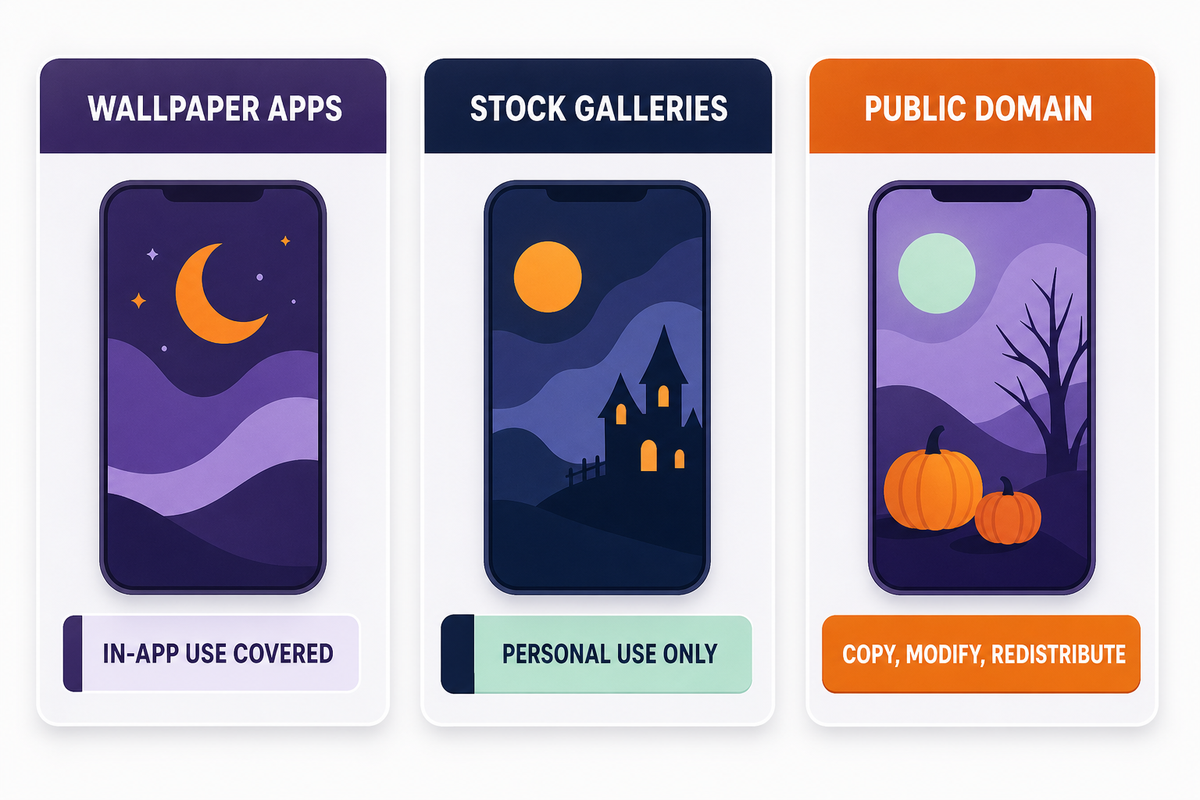
Free to download and free to reuse are two different permissions, and mixing them up is the one genuinely expensive mistake in this hobby. The U.S. Copyright Office states that “Copyright exists automatically in an original work of authorship once it is fixed”, and the owner keeps the rights to reproduce, adapt and distribute it.
Where Can I Find Free Halloween Backgrounds?
Three source lanes cover the free market, each with a different rights profile: wallpaper apps with built-in libraries, stock galleries with personal-use downloads, and public-domain collections with no strings attached. Wallpaper apps like iScreen’s 10,000+ theme catalog hands you images sized for phones with in-app use already covered.
Stock galleries promising you can download free graphic resources, the stock photo platforms and wallpaper aggregators built desktop-first, mostly grant personal use only. Several of the largest galleries gate their better files behind a free account or a trial tier; roundups of free Halloween iPhone wallpapers on lifestyle blogs draw from the same pool. Public-domain collections are the sleeper option: CC0-designated works allow anyone to copy, modify and distribute them, even commercially, without asking permission, and the Smithsonian alone released 2.8 million images under CC0, including eerie vintage art strange enough to inspire a whole matched setup. Search any collection for “hallowe’en” with the old apostrophe spelling to surface century-old poster art most galleries never index.
Use the three tiers of permission types in less than a minute. Personal use is just set it as your wallpaper and stop, no re-upload of your edit, no reselling a pack of 3 on a marketplace, no printing merch. Attribution licenses add a single responsibility, credit the artist where you share. CC0 and public domain remove the duties entirely. Watermarked previews denote a fourth category: the file is being promoted as a paid product, cropping the watermark off of a 99-cent artist pack violates the exact exclusive rights enumerated above. When a gallery page fails to post any license text, take it for personal-use-only; silence grants nothing.
Icons and Widgets That Match Your Halloween Background
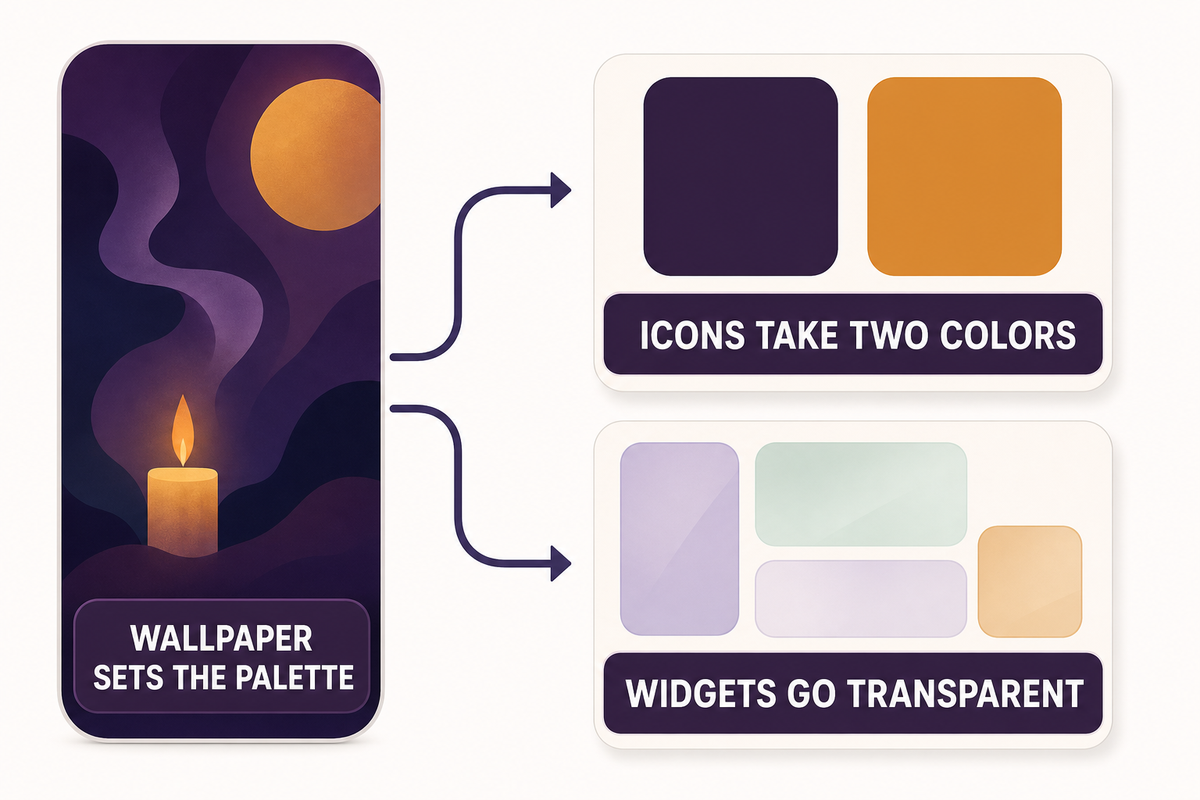
Once the background sticks, mismatched app icons become the loose thread: the Halloween spirit stops at the wallpaper when stock-blue icons sit over a gothic manor scene. Full coordination requires just one rule: wallpaper sets the palette, icons take its two dominant colors, widgets go transparent or matching-dark.
Doing that by hand means editing icons one at a time. A theme engine collapses it to one tap: iScreen ships 10,000+ themes, 5,000+ icons and 500+ widgets as matched sets, so a notch-4 gothic background arrives with its own icon pack and widget skins instead of a solo image file. Browse the iPhone theme packs for full coordinated sets, or start smaller with Halloween-ready widgets, a countdown widget over a spooky base being the classic October move. Whether one month of festivity justifies a full setup rebuild is a fair question; a ready-made set answers it by cutting the rebuild to minutes, and everything reverses on November 1 alongside the wallpaper swipe.
Want just the background, or the whole coordinated look?
FAQ: Halloween Backgrounds for iPhone
Q: What size should a Halloween wallpaper be for my iPhone?
Wallpaper size depends on your exact iPhone model, because recent models use four different screen resolutions, from 2556×1179 px up to 2868×1320 px, all of them at 460 ppi.
Q: Where can I find free Halloween backgrounds for iPhone?
Free sources fall into three lanes: wallpaper apps with built-in libraries, stock galleries with personal-use downloads, and CC0 public-domain collections with no restrictions at all.
Q: Are free Halloween wallpapers really free to use anywhere?
Free downloads normally cover personal use on your own device only; reposting, selling or editing the file requires whatever extra rights the source license actually grants you in writing.
Q: Can I use the same Halloween wallpaper on iPhone and Android?
Image files work across both platforms without conversion; only the fit differs, since Android screens use different resolutions and aspect ratios than the iPhone panels listed above.
Q: How do I make my iPhone Halloween wallpaper change by itself?
Photo Shuffle handles wallpaper rotation natively on iPhone: pick several images while adding a new wallpaper, then choose a rotation pace anywhere from every tap to once a day.
Q: When should I put Halloween wallpaper on my phone, and when should I take it off?
September 1 to November 1 is the window that matters: data from this run’s Google Ads keyword pull puts 89% of the year’s search interest in Halloween backgrounds for iPhone inside that 61-day span.
How This Guide Was Put Together
The style demand numbers come from a 12-month Google Ads keyword dataset pulled for this article, and every iPhone resolution cited was checked against Apple’s own spec pages rather than third-party size charts, two of which listed a phantom 2778×1284 px iPhone 17. The Scare Scale notches grew out of sorting the Halloween backgrounds people actually search for, cute through horror, against how each style behaves behind a Lock Screen clock. Reviewed by the iScreen team.
References & Sources
- NRF Consumer Survey: Halloween Spending to Reach Record $13.1 Billion — National Retail Federation
- iOS 27 to Let Users Generate Wallpapers With AI — MacRumors
- Dark Mode May Not Save Your Phone’s Battery Life as Much as You Think — Purdue University
- iOS 26 Tweaks iPhone Always-On Display Wallpaper Blur — 9to5Mac
- iPhone 17 Technical Specifications — Apple
- iPhone 16 Pro Max Tech Specs — Apple Support
- iPhone 16 and iPhone 16 Plus Technical Specifications — Apple
- Change Your iPhone Wallpaper — Apple Support
- iOS 26: Turn Photos Into 3D Spatial Scenes — MacRumors
- What Is Copyright? — U.S. Copyright Office
- CC0 1.0 Universal Public Domain Dedication — Creative Commons
- Smithsonian Releases 2.8 Million Images Into the Public Domain Using CC0 — Creative Commons
Related Articles
- Fall Backgrounds for iPhone — the shoulder-season set for early September and November
- Christmas Backgrounds for iPhone — the next seasonal window after this one closes